
An Ethernet switch can significantly improve your home network’s performance by helping more devices make full use of your available internet bandwidth. While it doesn’t increase the speed delivered by your Internet Service Provider (ISP), it reduces network bottlenecks, adds high-speed wired connections, and improves the overall experience for streaming, gaming, video calls, and other connected devices.
If your video calls stutter, your TV buffers while someone else is gaming, or your WiFi slows down when multiple devices are online, the issue may not be your internet connection—it may be how your home network is distributing that bandwidth.
An Ethernet switch helps solve that problem by expanding your wired network and reducing the demands placed on WiFi.
How an Ethernet Switch Improves Your Internet Experience
An Ethernet switch doesn’t create additional internet bandwidth. Instead, it helps your home network distribute the available bandwidth more efficiently by adding more high-speed wired connections.
When an ISP advertises speeds of 500 Mbps, 1 Gbps or even faster, that speed represents the connection entering your home.
From there, your router and home network are responsible for distributing that bandwidth to every connected device.
Today’s homes often have dozens of connected devices competing for that connection, including:
- Smart TVs
- Streaming devices
- Gaming consoles
- Desktop computers
- Laptops
- Smartphones
- Tablets
- Smart home devices
- Security cameras
- Network Attached Storage (NAS)
When several of these devices are active at the same time, your home network—not your ISP—often becomes the limiting factor.
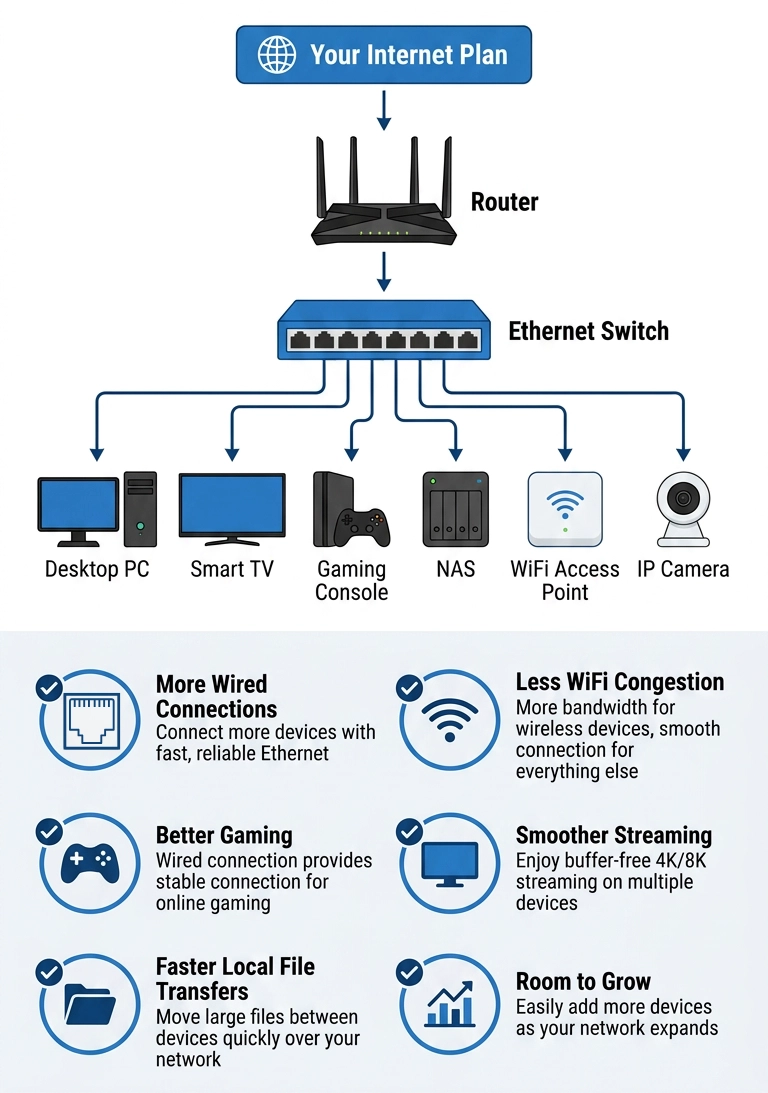
Rather than relying on WiFi for every device, an Ethernet switch allows multiple devices to communicate over dedicated Ethernet connections, reducing unnecessary wireless traffic and improving overall network performance.
For many households, this results in a smoother, more consistent online experience without changing their internet plan.
Five Ways an Ethernet Switch Can Improve Your Network Experience
- Reduce WiFi Congestion
Every device connected to WiFi shares the same wireless airtime.
The more devices competing for that airtime, the harder your wireless network has to work.
Moving high-bandwidth devices such as Smart TVs, desktop computers and gaming consoles to Ethernet reduces wireless congestion, allowing WiFi devices like phones and tablets to perform better.
- Give High-Performance Devices a Dedicated Connection
Some devices simply perform better with a wired connection.
For example:
- Gaming consoles
- Desktop PCs
- Smart TVs
- NAS devices
- Workstations
These devices often transfer large amounts of data or require a stable, low-latency connection. Connecting them through an Ethernet switch provides consistent performance that WiFi cannot always match.
- Improve Performance During Busy Times
Many families stream movies, attend video meetings, game online and back up files simultaneously.
An Ethernet switch helps keep traffic flowing efficiently by moving demanding devices off WiFi and onto dedicated wired connections.
The result is often fewer interruptions and a more consistent experience across the entire home.
- Eliminate Internal Network Bottlenecks
Your internet connection is only one part of your network.
Devices inside your home also communicate with one another.
For example:
- Copying files to a NAS
- Streaming media from a home server
- Sharing large files between computers
- Backing up multiple devices
When these activities occur over Ethernet instead of WiFi, they stay on the wired network, reducing unnecessary wireless traffic and improving overall network responsiveness.
- Expand Your Network as Your Needs Grow
Many routers only include four Ethernet ports.
As your network grows, you quickly run out of available connections.
An Ethernet switch expands your network by adding additional Ethernet ports, making it easy to connect more wired devices without replacing your existing router.
For growing households, home offices and entertainment systems, this flexibility becomes increasingly valuable over time.
👉 Read: Why Doesn’t My Router Have Enough Ethernet Ports?
When an Ethernet Switch Makes the Biggest Difference
An Ethernet switch provides the greatest benefit when:
- Multiple people stream video at the same time
- You work from home
- You play online games
- You regularly transfer large files
- You own a NAS
- You have several Smart TVs
- You have many wired devices but too few router ports
In these situations, improving the efficiency of your home network often has a greater impact than upgrading your internet plan alone.
What an Ethernet Switch Won’t Fix
An Ethernet switch is designed to improve your home network—not replace other networking equipment.
It won’t:
- Increase the speed provided by your ISP
- Improve weak WiFi coverage in distant rooms
- Fix an outdated modem or router
- Compensate for an internet plan that doesn’t provide enough bandwidth
If poor WiFi coverage is the issue, solutions such as relocating your router or extending a wired connection to another part of your home may be more effective.
Choosing the Right Ethernet Switch
If you’re ready to expand your wired network, choosing the right switch matters.
Consider:
- The number of Ethernet ports you need today and in the future
- Whether you would benefit from faster 2.5 Gigabit Ethernet speeds
- Whether you need Power over Ethernet (PoE) for devices like security cameras or wireless access points
- A plug-and-play unmanaged switch for easy installation
Selecting the right switch helps ensure your home network continues to perform well as you add more connected devices.
How an Ethernet Switch Improves You Home Network
FAQs
Does an Ethernet switch increase internet speed?
No. It doesn’t increase the speed delivered by your ISP, but it can help your home network use that bandwidth more efficiently.
Will an Ethernet switch improve gaming?
Yes. Connecting a gaming console or PC with Ethernet typically provides a more stable, lower-latency connection than WiFi.
Can an Ethernet switch reduce buffering?
It can if buffering is caused by WiFi congestion or multiple devices competing for wireless bandwidth.
Is a 2.5 Gigabit Ethernet switch worth it?
If you have a multi-gig internet plan or devices that support 2.5 GbE, a 2.5 Gigabit switch helps prevent your network from becoming the bottleneck.
Can I connect an Ethernet switch to my existing router?
Yes. Most unmanaged Ethernet switches are plug-and-play. Simply connect the switch to an available LAN port on your router to add more Ethernet connections.
Make the Most of Your Home Network
An Ethernet switch is one of the simplest ways to improve how your home network uses the internet speeds you’re already paying for. By reducing WiFi congestion, providing dedicated wired connections for high-performance devices, and expanding your network as your needs grow, it helps create a faster, more consistent online experience throughout your home.
If you’d like to learn more about how Ethernet switches work, the different types available, and how to choose the right one for your network, read our comprehensive Evergreen guide, What Is an Ethernet Switch and How Does It Work?, for a complete overview before selecting the best solution for your home.


