As homes and small offices add more connected devices, wired Ethernet often becomes the most reliable way to keep everything running smoothly. Desktop computers, gaming consoles, smart TVs, network-attached storage (NAS), printers, security cameras, and WiFi access points all benefit from a fast, stable wired connection.
An Ethernet switch makes this possible by expanding the number of wired connections available from a single router port. Instead of replacing your router when you need additional Ethernet ports, you can simply connect an Ethernet switch to your existing network and continue adding wired devices as your needs grow.
Hitron designs Ethernet switches for everyday environments where simple setup, quiet operation, and dependable performance are more important than advanced configuration.
What Is an Ethernet Switch?
An Ethernet switch is a networking device that connects multiple wired devices to the same local network. Each connected device communicates through its own dedicated connection, allowing data to move efficiently without interfering with traffic from other devices.
Unlike older networking hardware, modern Ethernet switches intelligently manage network traffic by identifying where each piece of data needs to go. Rather than sending data to every connected device, the switch forwards it only to the intended destination. This reduces unnecessary network traffic and helps maintain fast, reliable communication between devices.
An Ethernet switch does not replace your router. Instead, it expands your existing network by providing additional Ethernet ports, making it easy to connect more wired devices throughout your home or office.
Whether you’re adding a desktop computer to a home office, connecting multiple gaming consoles, or building a more reliable entertainment system, an Ethernet switch provides a simple way to grow your wired network.
How an Ethernet Switch Works
An Ethernet switch receives data from one connected device and forwards it only to the device that is meant to receive it. To do this, the switch automatically learns the unique hardware address (called a MAC address) of every connected device and builds a table that helps direct network traffic efficiently.
Because data is delivered only to its intended destination, multiple devices can communicate across the network at the same time without creating unnecessary congestion.
In a typical home or small office network:
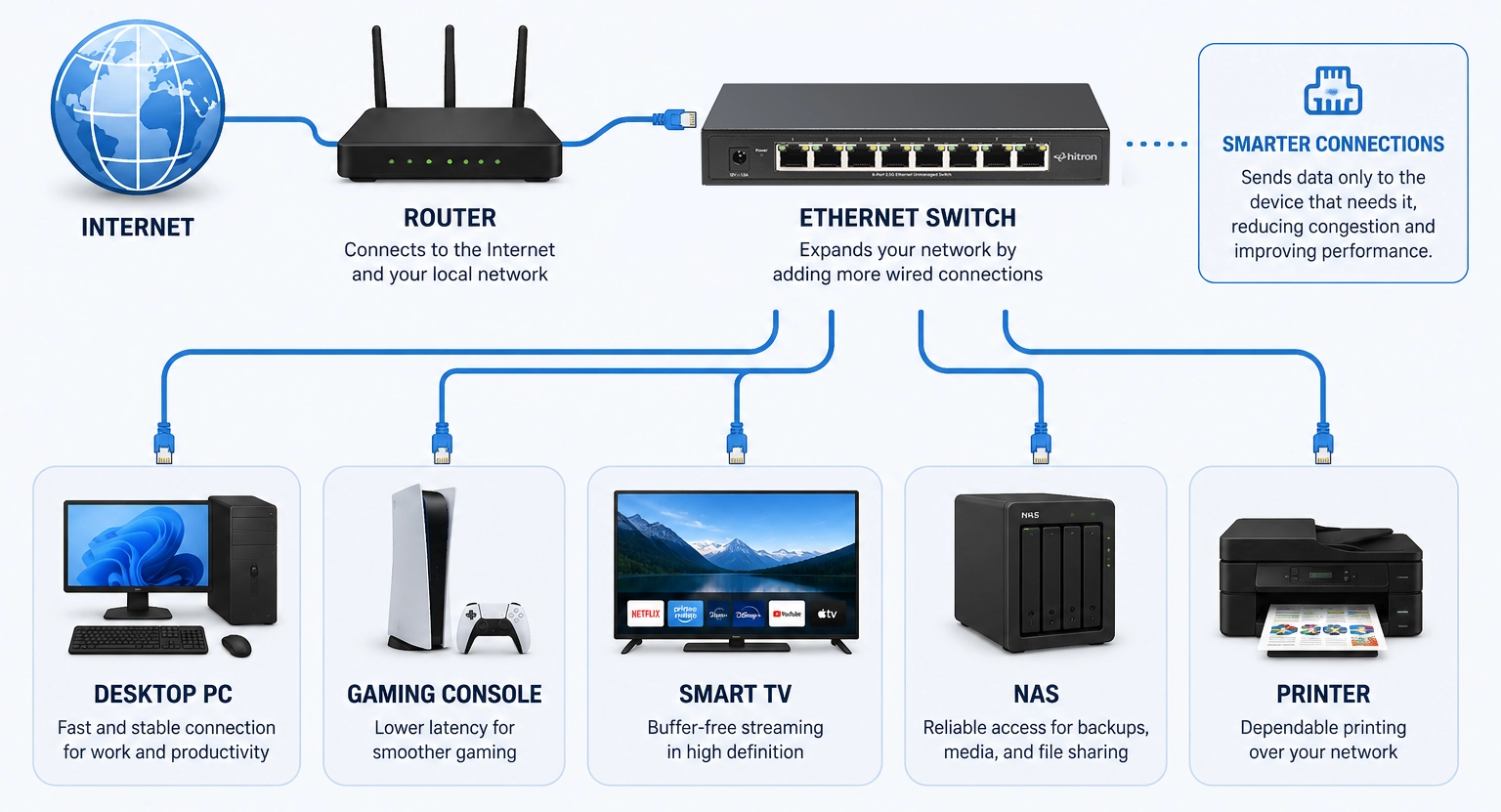
- Your router connects to the Internet through your Internet Service Provider (ISP).
- The Ethernet switch connects to one of the router’s available LAN ports.
- Wired devices connect to the Ethernet switch.
- The router provides Internet access, while the switch allows additional devices to share that connection.
This arrangement lets many devices communicate simultaneously while maintaining stable wired performance.
Modern Ethernet switches also automatically detect the speed supported by each connected device and Ethernet cable, allowing older and newer equipment to work together without manual configuration.
How an Ethernet Switch Expands Your Network
Connect multiple wired devices to your network with fast, reliable performance.
Why Use an Ethernet Switch Instead of WiFi Alone
WiFi offers convenience and mobility, but a wired Ethernet connection often provides greater consistency for devices that remain in one location.
While today’s WiFi networks are faster than ever, wireless signals can still be affected by distance, walls, interference from neighboring networks, and the number of connected devices sharing the same wireless bandwidth.
Connecting stationary devices with Ethernet helps reduce these variables while freeing WiFi capacity for smartphones, tablets, and other mobile devices.
An Ethernet switch helps by providing:
- Stable connections for desktop computers and home office equipment
- Reliable performance for online gaming and 4K or 8K streaming
- Lower latency for applications that benefit from real-time responsiveness
- Reduced wireless congestion by moving stationary devices off WiFi
- Consistent performance for network-attached storage (NAS), backups, and large file transfers
Many modern networks use both technologies together. WiFi provides flexibility for mobile devices, while Ethernet delivers dependable wired connectivity for equipment that benefits from maximum performance and stability.
This hybrid approach allows your network to support more devices while delivering a better overall experience throughout your home or small office.
Why Are Ethernet Switches Becoming More Common?
The average home network looks very different than it did just a few years ago. Many households now have multiple computers, smart TVs, gaming consoles, streaming devices, security cameras, network storage systems, and smart home hubs—all competing for reliable network access.
At the same time, Internet speeds continue to increase, with many providers offering Gigabit and multi-gigabit service plans. As networks become faster and more connected, many homeowners choose to move stationary devices from WiFi to Ethernet to improve reliability and reduce wireless congestion.
Adding an Ethernet switch is often one of the simplest and most cost-effective ways to expand a wired network without replacing existing networking equipment.
When Adding an Ethernet Switch Makes Sense
An Ethernet switch is a practical solution anytime you need more wired connections than your router can provide. Most home routers include only three or four available Ethernet LAN ports, which can quickly become occupied as you add more connected devices.
Rather than replacing your router, an Ethernet switch expands your existing network by adding additional Ethernet ports through a single router connection.
Common situations where adding an Ethernet switch makes sense include:
- Running out of Ethernet ports on your router
- Setting up a home office with multiple wired computers, printers, or docking stations
- Connecting smart TVs, streaming devices, and gaming consoles in an entertainment center
- Supporting network-attached storage (NAS) for backups and media sharing
- Installing wired WiFi access points to improve wireless coverage
- Connecting small business equipment such as point-of-sale (POS) systems, VoIP phones, and desktop computers
- Expanding a network as new devices are added over time
Because Ethernet switches simply extend your existing wired network, they provide an easy way to grow without changing your Internet service or replacing networking equipment that already works well.
If you’ve found yourself unplugging one device to connect another, or wondering why your router only has a few Ethernet ports, you’re not alone. Most home routers are designed for typical household use, which is why many growing networks eventually benefit from adding an Ethernet switch.
👉 Read: How to Add More Ports to Your Router
Ethernet Switch vs. Router
Although they often work together, an Ethernet switch and a router perform two very different jobs within your network.
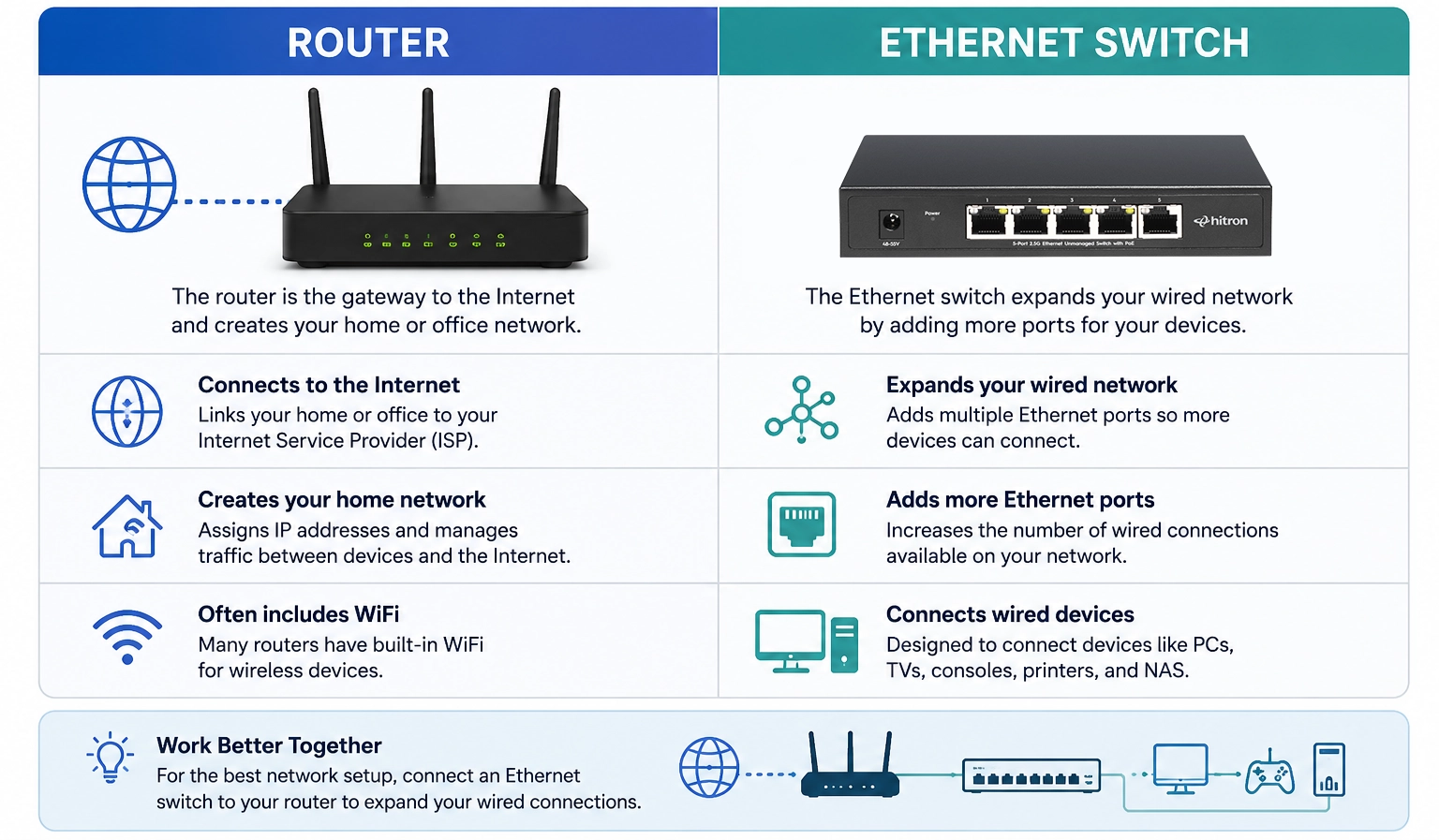
A router connects your home or business to the Internet. It manages traffic between your local network and your Internet Service Provider (ISP), assigns IP addresses to connected devices, and often provides built-in WiFi.
An Ethernet switch, on the other hand, expands your local wired network by allowing more Ethernet devices to communicate with one another and access the Internet through the router.
A simple way to think about it is:
- Router = Connects your network to the Internet
- Ethernet Switch = Connects more devices to your local network
Most home and small office networks use both devices together. The router serves as the gateway to the Internet, while the Ethernet switch creates additional wired connections wherever they’re needed.
Router vs Ethernet Switch
Two different devices. Two important jobs.
Ethernet Switch vs. Hub
Although Ethernet hubs were once common, they have largely been replaced by Ethernet switches because switches provide much better performance and efficiency.
A hub simply broadcasts incoming data to every connected device, whether the data belongs there or not. This creates unnecessary network traffic and reduces efficiency as more devices are added.
An Ethernet switch works differently. It learns the location of each connected device and forwards data only to the intended destination. This intelligent traffic management reduces congestion and allows multiple devices to communicate simultaneously.
Hub
Ethernet Switch
Today, Ethernet switches are the standard choice for nearly all home and business wired networks.
Unmanaged vs. Managed Ethernet Switches
Ethernet switches generally fall into two categories: unmanaged and managed.
Understanding the difference helps ensure you choose the right switch for your networking needs.
Unmanaged Ethernet Switches
Unmanaged switches are designed for simplicity. They operate automatically, requiring no software installation or network configuration.
Simply connect the switch to your router, plug in your Ethernet devices, and the network is ready to use.
Unmanaged switches are ideal for:
- Homes
- Apartments
- Home offices
- Entertainment systems
- Gaming setups
- Small businesses
Because they’re easy to install and require virtually no maintenance, unmanaged switches are the best choice for most residential users.
👉 Read: Unmanaged Ethernet Switches Explained: Simple, Fast, No Setup
Managed Ethernet Switches
Managed switches provide advanced networking features for organizations that need greater control over network traffic.
Common features include:
- VLAN support
- Quality of Service (QoS)
- Traffic monitoring
- Port management
- Network security settings
- Remote administration
These capabilities make managed switches well suited for larger businesses, enterprise environments, schools, and organizations with dedicated IT staff.
For most homes and small offices, however, these advanced features aren’t necessary, making unmanaged switches the simpler and more cost-effective choice.
👉 Read: Managed vs. Unmanaged Ethernet Switches: Which Is Right for You?
PoE vs. Non-PoE Ethernet Switches
Another important consideration when choosing an Ethernet switch is whether you need Power over Ethernet (PoE).
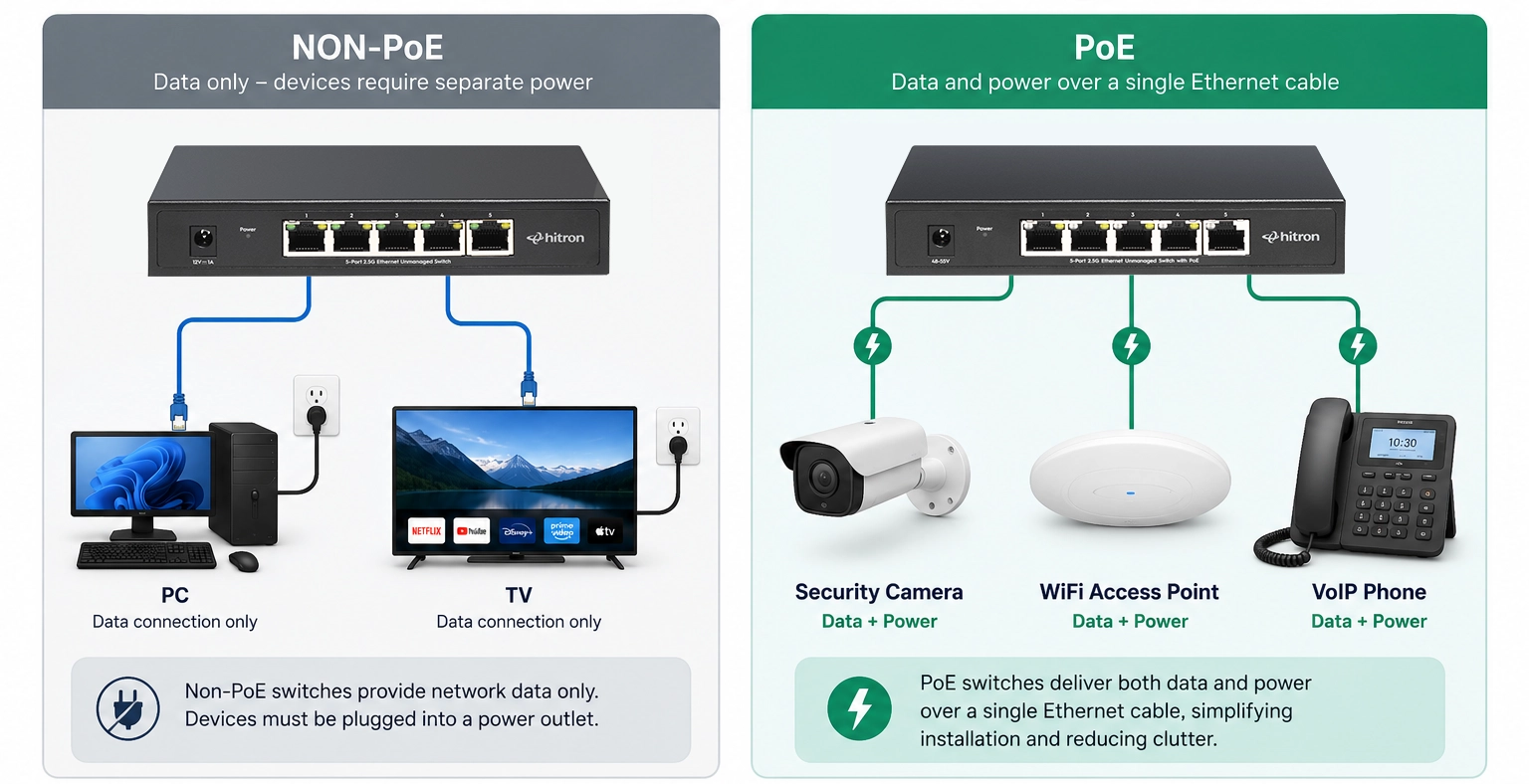
A standard (non-PoE) Ethernet switch transfers data between connected devices but does not provide electrical power.
A PoE Ethernet switch delivers both data and power over a single Ethernet cable, eliminating the need for a separate power outlet near compatible devices.
Non-PoE v PoE
Power over Ethernet PoE delivers both power and data over single Ethernet cable.

Key Benefit:
PoE reduces the need for power outlets near devices, making installation easier, especially in hard-to-reach or high locations.
PoE is commonly used with:
- Security cameras
- Ceiling-mounted WiFi access points
- VoIP phones
- Access control systems
- Networked intercoms
For devices that only require a network connection—such as desktop computers, gaming consoles, smart TVs, printers, and NAS devices—a standard Ethernet switch is usually all that’s needed.
If your network includes powered devices installed on walls or ceilings, a PoE switch can simplify installation while reducing cable clutter.
👉 Read: Do You Need PoE (Power over Ethernet) for Home or Small Office?
Choosing the Right Ethernet Switch
Most Ethernet switches look similar from the outside, but choosing the right one depends on how you plan to use your network today—and how it may grow in the future.
Here are a few factors to consider.
Number of Ethernet Ports
Start by counting the wired devices you plan to connect today, then allow room for future expansion.
For many home offices and entertainment centers, a 5-port switch provides enough connections.
Larger homes, growing families, and small businesses often benefit from an 8-port switch, which offers additional flexibility as more wired devices are added.
👉 Read: 5-Port vs. 8-Port Ethernet Switch: Which One Should You Choose?
Ethernet Speed
Most modern switches support Gigabit Ethernet, while newer multi-gigabit switches support speeds of 2.5 Gbps or faster.
If you have a Gigabit Internet plan, stream high-resolution video, transfer large files between computers, or use network-attached storage, a multi-gigabit switch can help your local network keep pace with today’s faster broadband services.
👉 Read: 1G vs. 2.5G Ethernet: When Does It Matter?
Power over Ethernet (PoE)
If your network includes compatible devices such as security cameras or WiFi access points, a PoE switch can simplify installation by delivering both power and data over one Ethernet cable.
If you only need to connect traditional wired devices, a standard non-PoE switch may be the better choice.
Future Expansion
Many people purchase an Ethernet switch to solve an immediate problem—only to discover they need additional ports a year later.
Choosing a switch with a little extra capacity today can help accommodate future devices without requiring another upgrade.
As smart home technology, streaming devices, gaming systems, and home offices continue to grow, planning ahead often saves both time and money.
Getting the Most from Your Ethernet Switch
An Ethernet switch is designed to make expanding your wired network simple, but a few best practices can help you get the most from your investment.
- Choose a switch with enough ports for future growth.
- Use quality Ethernet cables that support your desired network speed.
- Install the switch in a well-ventilated location.
- Place the switch near the group of wired devices it will serve whenever practical.
- Consider whether future devices may require Power over Ethernet (PoE).
Many installation issues are easy to avoid with a little planning, helping your network remain reliable as your connectivity needs continue to grow.
Before purchasing a switch, it’s also worth understanding some of the most common installation and planning mistakes people make when expanding a wired network.
👉 Read: Common Ethernet Switch Mistakes to Avoid
FAQs
Does an Ethernet switch increase Internet speed?
An Ethernet switch does not increase the speed of your Internet service plan. Your maximum Internet speed is determined by your Internet Service Provider (ISP) and the speed of your broadband connection.
However, an Ethernet switch can improve the overall performance of your home or small office network by providing reliable wired connections, reducing WiFi congestion, and allowing multiple devices to communicate efficiently at the same time.
Many people notice a more stable online experience after connecting stationary devices with Ethernet because wired connections are less susceptible to wireless interference.
Can multiple devices use an Ethernet switch at the same time?
Yes. Modern Ethernet switches are designed to allow multiple connected devices to communicate simultaneously.
Unlike older network hubs, an Ethernet switch intelligently directs traffic only to the intended device, allowing computers, gaming consoles, streaming devices, printers, and network storage systems to share the network efficiently.
Is an Ethernet switch difficult to install?
No. Most home and small office users choose an unmanaged Ethernet switch because installation is simple.
Typically, installation involves just three steps:
- Connect the Ethernet switch to an available LAN port on your router.
- Connect your wired devices to the switch.
- Power on the switch.
Most unmanaged Ethernet switches automatically detect connected devices and begin working immediately without requiring software installation or network configuration.
Do Ethernet switches work with any router?
Yes. Standard Ethernet switches are compatible with virtually any modern router that includes Ethernet LAN ports.
Whether your Internet connection is cable, fiber, fixed wireless, or DSL, an Ethernet switch simply expands your existing wired network, it does not replace your router or change how your Internet connection works.
Can I connect one Ethernet switch to another?
Yes. Connecting one Ethernet switch to another is a common way to expand a wired network into another room, floor, or workspace.
For example, you might install one switch beside your router and another in a home office or entertainment center to provide additional Ethernet ports where they’re needed most.
What's the difference between a PoE and a non-PoE Ethernet switch?
A standard Ethernet switch transfers data between connected devices.
A Power over Ethernet (PoE) switch transfers both data and electrical power through the same Ethernet cable, allowing compatible devices such as security cameras, WiFi access points, and VoIP phones to operate without a separate power adapter.
If your devices only require network connectivity, a standard Ethernet switch is often the simplest solution.
Choosing the Right Hitron Ethernet Switch
Whether you’re expanding a home network, upgrading a home office, or connecting more wired devices in a small business, choosing the right Ethernet switch depends on your networking needs.
If you’re simply looking to add more Ethernet ports for desktop computers, gaming consoles, smart TVs, network-attached storage (NAS), or streaming devices, an unmanaged Ethernet switch provides fast, reliable connectivity with virtually no setup.
For users who also need to power compatible devices such as security cameras, ceiling-mounted WiFi access points, or VoIP phones, a Power over Ethernet (PoE) switch can simplify installation by delivering both power and data through a single Ethernet cable.
Hitron offers unmanaged Ethernet switches designed for both types of deployments:
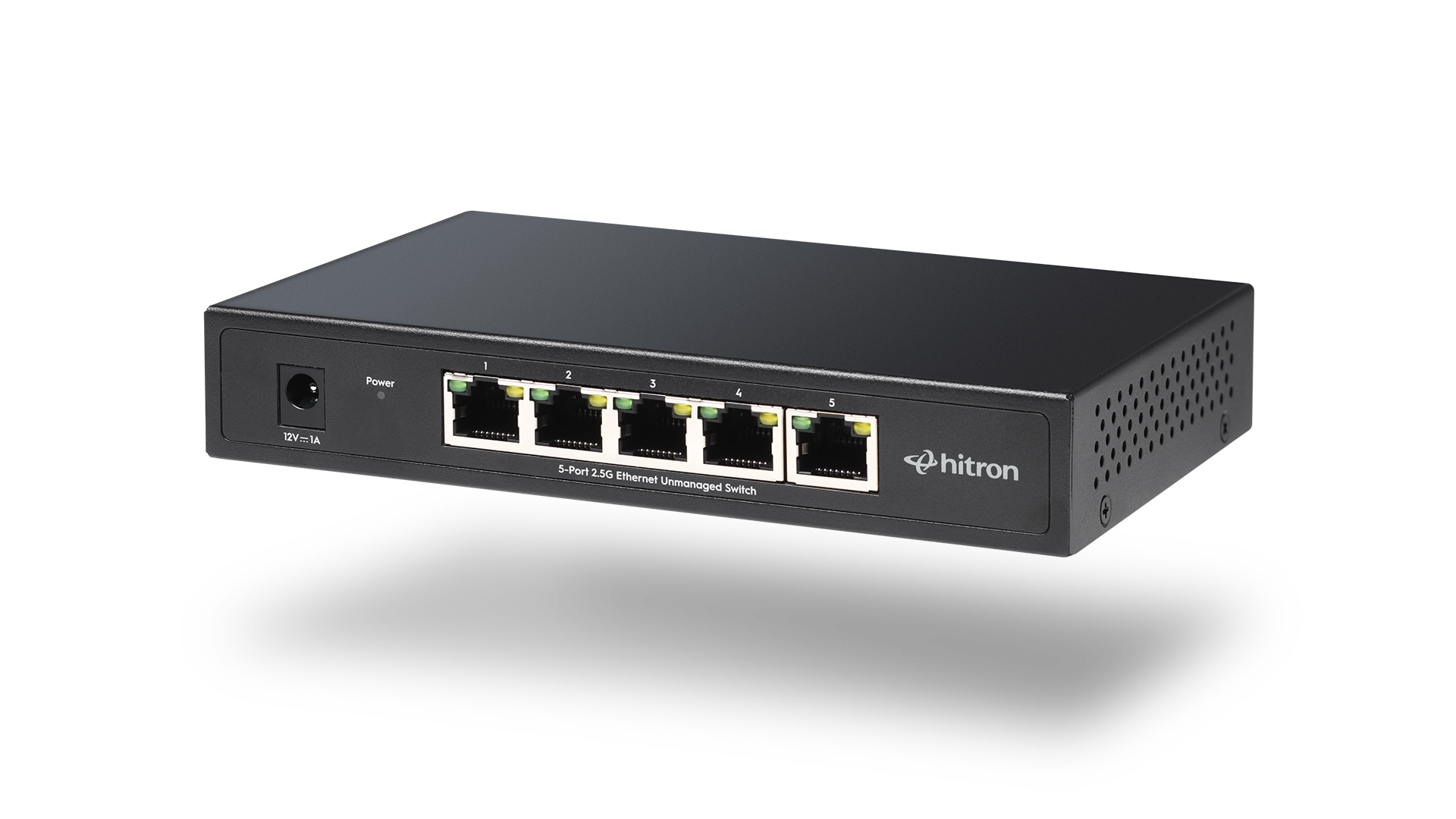
A compact unmanaged switch with five high-speed Ethernet ports, ideal for home offices, entertainment centers, and smaller wired networks.
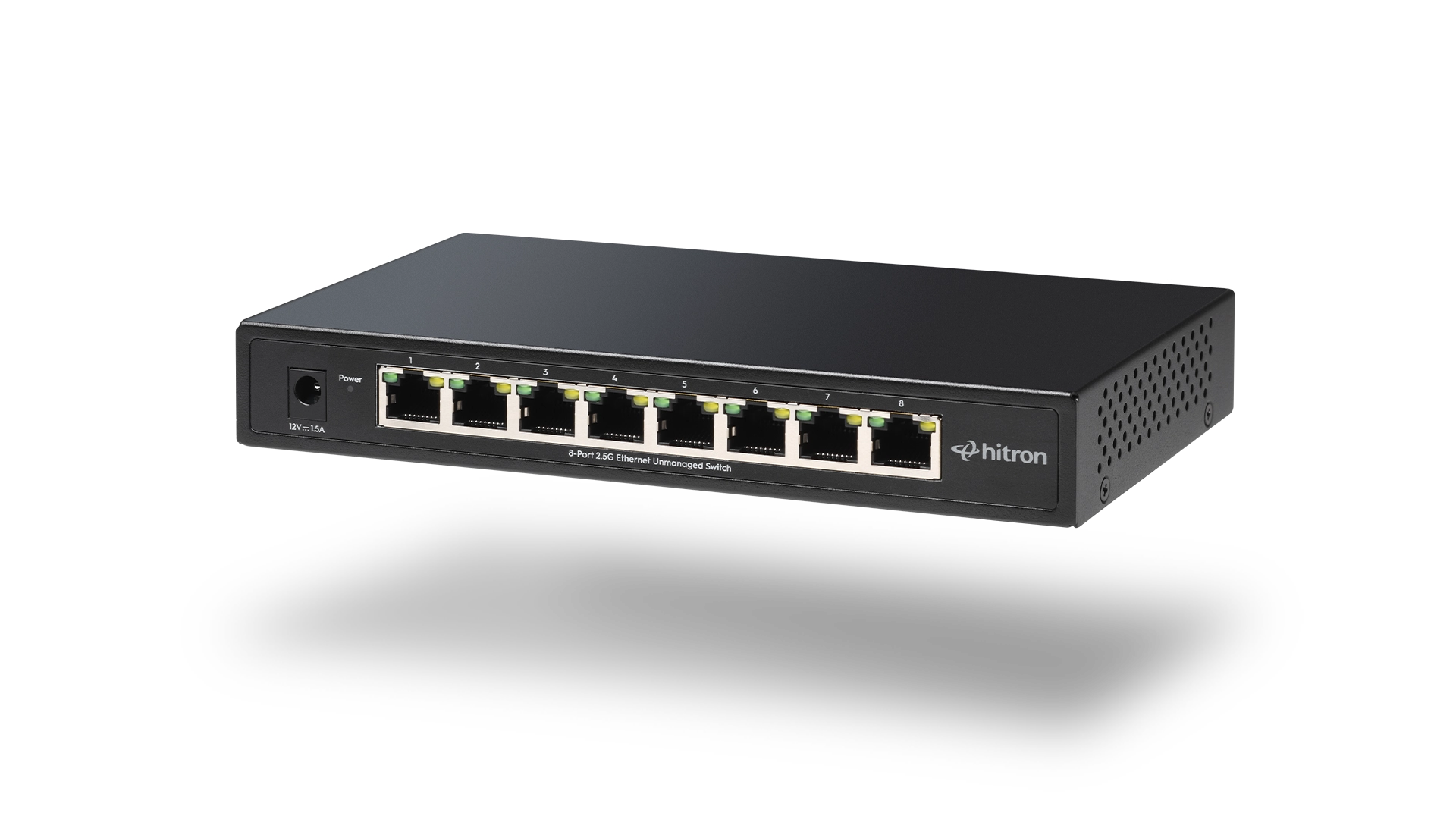
An eight-port unmanaged switch designed for growing homes and small businesses that require additional wired connections while maintaining simple plug-and-play installation.