
Yes. In many homes, you can use existing coax outlets to create fast, wired Ethernet connections without installing new Ethernet cable. MoCA adapters convert the coaxial cable already running through your walls into a wired network connection.
But not every coax outlet is automatically ready for MoCA. The outlets need to be part of the same connected coax network, and the splitters and other equipment between them must be compatible.
If you’re wondering will MoCA work on my coax outlets, here is what you need to check.
How Can a Coax Outlet Provide Ethernet?
A coax outlet cannot accept an Ethernet cable directly. You need a MoCA adapter to bridge the Ethernet connection from your router or device to your home’s coax wiring.
A typical setup looks like this:
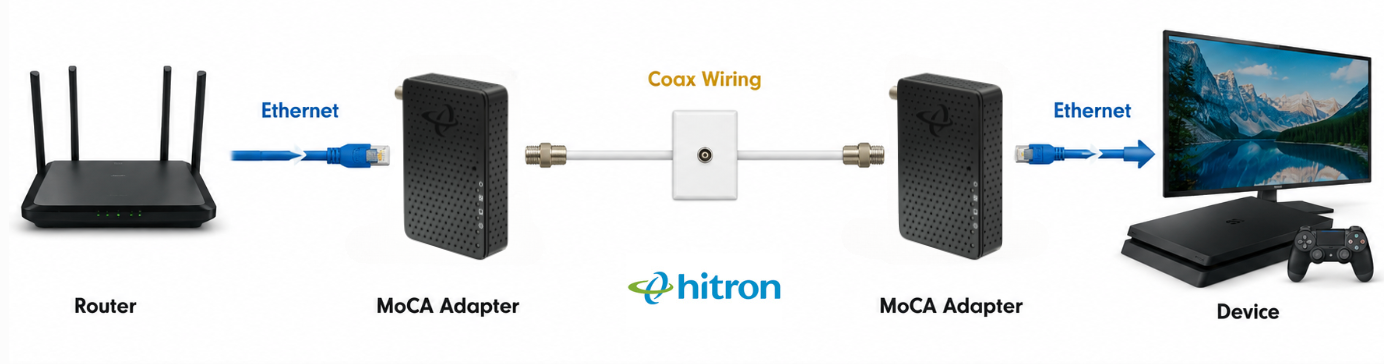
One MoCA adapter connects your router to the coax network. A second adapter connects to a coax outlet in the room where you want Ethernet.
For example, if your router is in the living room and your home office is upstairs, MoCA can use the coax wiring between those rooms to create a wired network connection without running new Ethernet cable through the walls.
If both rooms have connected coax outlets, you can place one MoCA adapter near your router and another in your office. The adapters communicate over the coax wiring, giving you an Ethernet connection upstairs without running a new Ethernet cable between the rooms.
This can be especially useful for:
- Desktop computers
- Gaming consoles
- Smart TVs
- Streaming devices
- WiFi access points
- Ethernet switches
- Home offices
👉 Related: What Is MoCA and How Does It Work?
Do I Need a MoCA Adapter at Every Coax Outlet?
No. You only need MoCA adapters at the locations where you want to create a MoCA connection.
For a basic setup, you typically need two MoCA-enabled endpoints:
- One connected to your router and coax network.
- One connected to the coax outlet where you want Ethernet.
If your router or gateway has MoCA built in, you may only need a separate MoCA adapter at the other end.
👉 Related: [Do I Need One MoCA Adapter or Two?]
Will MoCA Work on My Coax Outlets?
Your coax outlets can usually support MoCA if they are connected through compatible coax wiring and splitters.
The important question is not simply whether you can see a coax outlet on the wall. You need to know what happens to the cable behind the wall.
Here are the most important things to check.
1. You Need Coax Outlets Where You Want Ethernet
Start with the obvious question: Do you have coax outlets near both ends of the connection?
For example, if your router is in the living room and you want Ethernet in your home office, you ideally need access to your home’s coax network at both locations.
Existing coax outlets can be particularly useful in rooms where installing Ethernet would otherwise require opening walls, fishing cable between floors or running visible Ethernet cable.
2. The Coax Outlets Need to Be Connected to the Same Coax Network
Having a coax outlet in your living room and another in your home office does not automatically mean there is a working coax path between them.
Each wall outlet usually has its own coax cable running behind the wall. Those individual cables often meet at a central coax splitter, which connects the different coax runs in your home.
For example:
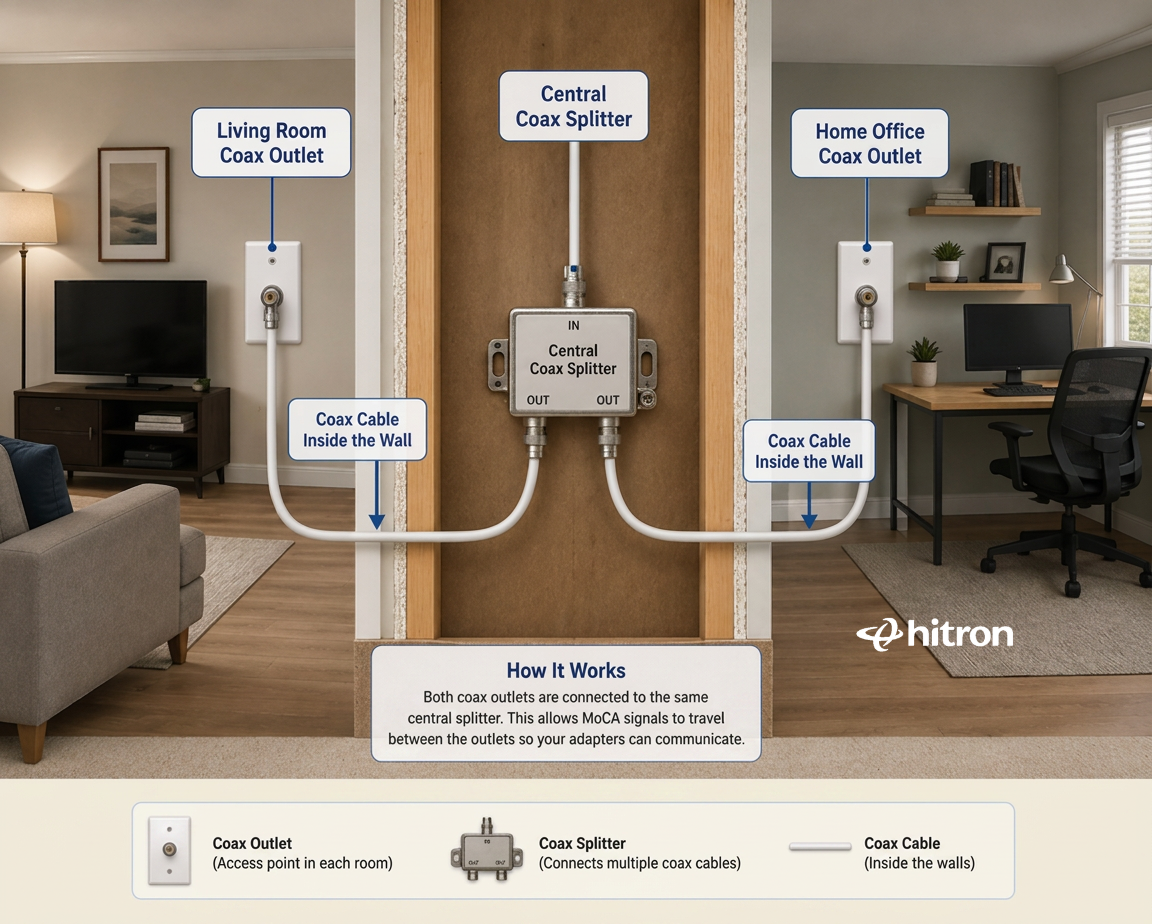
For MoCA to work between these rooms, both coax cables need to be connected to the same coax network through a compatible splitter or other MoCA-compatible connection.
This matters because older homes often have coax cables that are no longer connected. A previous homeowner or service technician may have disconnected unused rooms, removed a splitter or changed the wiring when cable or satellite service was installed.
If the living room coax cable is connected to the splitter but the home office cable is not, the two MoCA adapters will not be able to communicate.
How to Check Whether Your Coax Outlets Are Connected
Look for the location where your home’s coax cables come together. Common locations include:
- Near your home’s cable service entry point
- A basement or utility room
- Near the electrical panel
- A structured wiring enclosure
- An exterior cable box
Look for several coax cables connected to a splitter.
If the cables are labelled “Living Room,” “Office,” “Bedroom” or similar, identifying the correct runs may be straightforward.
If they aren’t labelled, you may need to trace or test them. A coax cable tester can help identify which cable connects to each wall outlet.
Your goal is to confirm that the coax outlet near your router and the coax outlet where you want Ethernet have a continuous coax path between them.
💡 Tip: Don’t assume that every coax outlet in your house is active simply because there is a wall plate installed. An unused coax run may have been disconnected years ago.
3. Your Coax Splitters Need to Support MoCA Frequencies
If your coax outlets connect through a splitter, that splitter needs to pass the frequencies used by MoCA.
MoCA 2.5 operates in the 1125–1675 MHz frequency range. Many older coax splitters were designed for cable TV and may only be rated to 1000 MHz (1 GHz). These splitters can weaken or block the higher-frequency MoCA signal traveling between your adapters.
Check the label printed directly on your splitter. It should show its supported frequency range.
For example:
- 5–1000 MHz: Not recommended for MoCA 2.5
- 5–1675 MHz: Supports the frequency range used by MoCA 2.5
- 5–2500 MHz: May pass MoCA frequencies, but a splitter specifically designed and rated for MoCA is preferable
Also avoid using more splitters than necessary. Every split reduces signal strength, and unused or unnecessary coax branches can make your MoCA network more difficult to troubleshoot.
💡 Tip: If your splitter is old, unlabelled, or only rated to 1000 MHz, replacing it with a MoCA-compatible splitter rated to at least 1675 MHz is a simple way to eliminate a potential compatibility problem.
4. Check Satellite TV Equipment
If your home’s coax wiring is or was used for satellite television, you need to look more carefully at how the coax network is configured.
Satellite systems can use frequencies and components that overlap with or interfere with standard MoCA networking. Satellite splitters, amplifiers and other equipment may also prevent MoCA adapters from communicating correctly.
That does not necessarily mean the coax cable itself cannot be used. The issue may be the equipment connected to it.
If you have an active satellite system, check the compatibility requirements for both systems before connecting MoCA equipment.
5. Check for Coax Amplifiers
Some homes have coax amplifiers installed to strengthen cable TV or broadband signals.
Depending on the amplifier, MoCA signals may not be able to pass through it. That can prevent two otherwise connected coax outlets from communicating.
If your coax outlets appear to be connected but your MoCA adapters cannot establish a connection, check the coax path for an amplifier.
If an amplifier is required for your home’s cable system, it may need to be replaced with a MoCA-compatible model or the MoCA network may need to be configured around it.
6. Check the Condition of Your Coax Wiring
MoCA is designed to work with the coax wiring already installed in many homes, so you do not necessarily need brand-new cable.
However, damaged cables, loose connectors, excessive splitters or poorly terminated connections can reduce signal quality.
Check accessible coax connections for obvious problems such as:
- Loose connectors
- Damaged cable
- Corroded fittings
- Unused splitters
- Unnecessary cable branches
Simplifying the coax path where possible can help create a more reliable MoCA network.
7. Check Whether You Need a MoCA Point-of-Entry Filter
If your home’s coax network connects to an external cable provider network, a MoCA Point-of-Entry, or PoE, filter may be recommended.
The filter is typically installed where the provider’s coax line enters your home’s coax network. It helps keep the MoCA signal contained within your home and can also improve the performance of the MoCA network.
Do not confuse a MoCA PoE filter with Power over Ethernet (PoE). They are unrelated technologies.
💡 Tip: Before installing or changing equipment at your cable service entry point, check the requirements of your Internet or cable provider.
Can I Use a Coax Outlet That’s Already in Use?
Often, yes. You do not necessarily need an unused coax outlet to use MoCA.
MoCA is designed so network data can share compatible coax wiring with certain existing cable services. For example, a coax network may be carrying both cable Internet signals and MoCA network traffic.
However, what is already connected matters.
If the outlet or coax network is being used for:
- Cable Internet: MoCA can often coexist with the cable service, provided the network is configured correctly.
- Cable TV: MoCA can often share the same coax network with compatible cable TV services.
- Satellite TV: Compatibility requires more careful checking because satellite systems can use overlapping frequencies or incompatible equipment.
- Other coax equipment: Check whether splitters, amplifiers or other devices in the signal path support MoCA.
So, don’t assume that an occupied coax outlet cannot be used. First determine what is using the outlet and what equipment sits between the MoCA adapters.
What Can I Connect to a MoCA Adapter?
A MoCA adapter gives you an Ethernet connection at the other end of your coax network.
You can connect devices such as:
- Desktop computers
- Gaming consoles
- Smart TVs
- Streaming devices
- WiFi access points
- Ethernet switches
Can I Connect an Ethernet Switch to a MoCA Adapter?
Yes. This can be particularly useful if you want several wired connections in a room that has only one coax outlet.
For example:
Coax Outlet
↓
MoCA Adapter
↓
Ethernet Switch
↓
Smart TV + Gaming Console + Computer + Streaming Device
The MoCA connection provides the wired network path back to your router, while the Ethernet switch gives you additional Ethernet ports for devices in that room.
👉 Related: What Is an Ethernet Switch and How Does It Work?
Do I Need to Run Ethernet Cable Instead?
If your home already has Ethernet installed where you need it, using that Ethernet connection is usually the simplest option.
But if your home has coax outlets and doesn’t have Ethernet wiring in the rooms where you need wired Internet, MoCA can let you use the wiring that’s already inside your walls.
That can save you from opening drywall, fishing Ethernet cable between floors or running long visible cables through your home.
MoCA does not replace Ethernet at the device. Instead, it uses your existing coax wiring to bridge the Ethernet connection between rooms.
What If My Coax Outlets Don’t Work with MoCA?
If your MoCA adapters don’t establish a connection, don’t immediately assume your coax wiring cannot support MoCA.
Start with the most common causes:
- Confirm both outlets are connected to the same coax network.
- Check that your splitter supports MoCA frequencies.
- Look for disconnected coax runs.
- Check for incompatible amplifiers or satellite equipment.
- Inspect accessible coax connectors and cables for damage or loose connections.
The coax cable itself may be perfectly usable. The problem may simply be a component or disconnected cable somewhere between the two outlets.
FAQs
Can any coax outlet be converted to Ethernet?
Not automatically. A coax outlet can be used as part of a MoCA network if it connects to compatible coax wiring and the necessary MoCA equipment. Splitters, amplifiers and other devices between the outlets can affect whether the connection works.
Can old coax cables work with MoCA?
Often, yes. The age of the cable alone does not determine whether MoCA will work. How the cables are connected, their condition, and the splitters and other equipment in the coax network are also important.
Can I plug an Ethernet cable directly into a coax outlet?
No. Coax and Ethernet use different connectors and signaling technologies. You need a MoCA adapter to convert the network signal between Ethernet and coax.
Can old coax wiring work with MoCA?
Often, yes. The age of the coax cable alone does not determine whether MoCA will work. The condition of the cable, how the coax runs are connected and the splitters and other equipment in the signal path are also important.
Can I use multiple coax outlets for Ethernet?
Yes. A properly configured MoCA network can support multiple MoCA devices, allowing you to create wired network connections in several rooms that have connected coax outlets.
How do I know if a coax outlet is active?
Use the Coax Wiring You Already Have
If your home already has coax outlets, you may already have much of the wiring you need to create wired network connections in rooms where Ethernet isn’t installed.
The Hitron HTEM5 MoCA 2.5 Adapter lets you use compatible existing coax wiring to extend your Ethernet network to rooms where running new Ethernet cable may be difficult. With MoCA 2.5 connectivity and a 2.5 Gigabit Ethernet port, the HTEM5 can help create high-speed wired connections for gaming, streaming, home offices and other connected devices.
Before you buy, check that the coax outlets you want to use are connected and that the splitters and other equipment along the coax path are compatible with MoCA.
Learn more about the Hitron HTEM5 MoCA 2.5 Adapter.


