
Most homes need two MoCA adapters to create a MoCA connection: one connected to the router and one in the room where you want Ethernet. You may need only one adapter if your gateway already has MoCA built in and enabled. For additional rooms, you typically add one MoCA adapter per location.
The right number depends on your existing equipment and how many areas of your home you want to connect.
Why Do You Usually Need Two MoCA Adapters?
A MoCA connection needs a MoCA-capable device at both ends of the connection.
If you have a standard router without built-in MoCA, the setup typically looks like this:
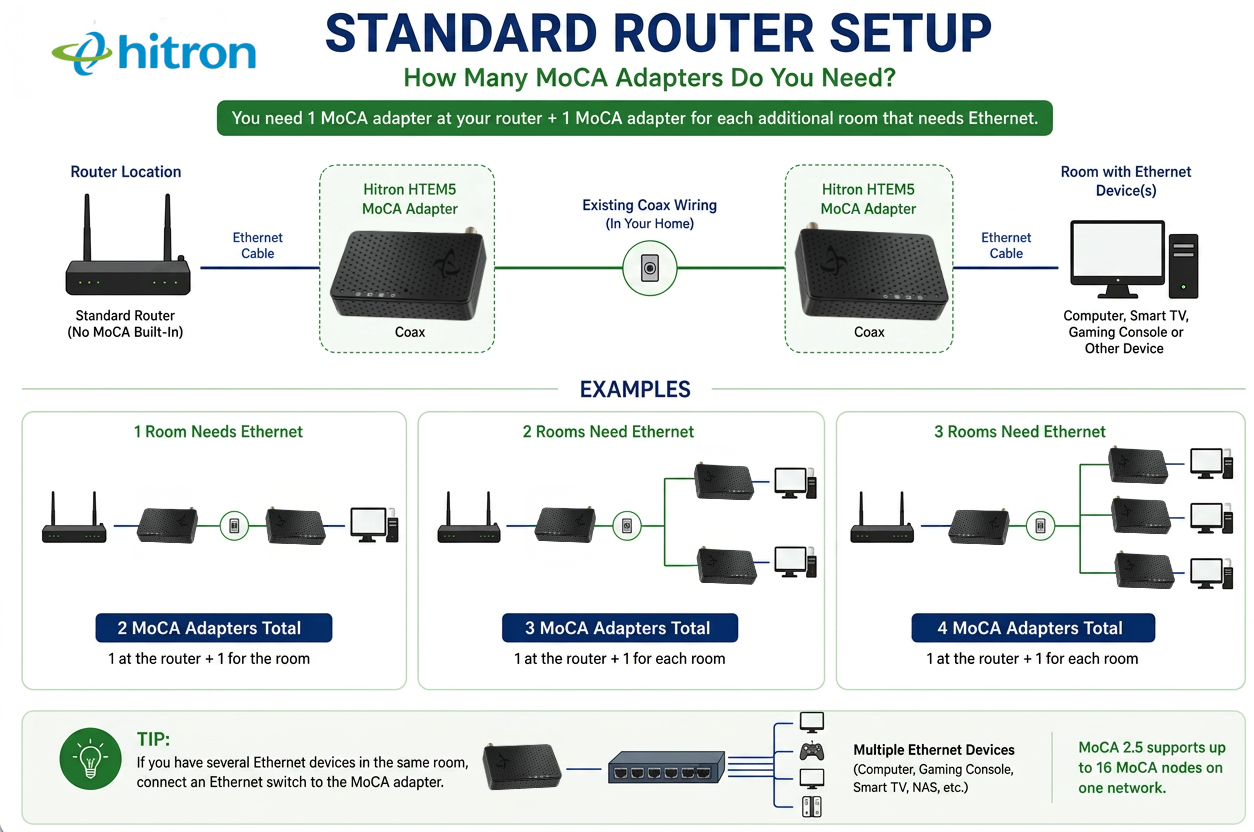
The first adapter takes the Ethernet connection from your router and sends it over your home’s coax wiring.
The second adapter receives that connection at another coax outlet and converts it back to Ethernet for your computer, gaming console, Smart TV or other Ethernet device.
For example:
Living Room
Router → Ethernet Cable → MoCA Adapter → Coax Outlet
Home Office
Coax Outlet → MoCA Adapter → Ethernet Cable → Computer
In this setup, you need two MoCA adapters.
When Do I Need Only One MoCA Adapter?
You may need only one standalone MoCA adapter if your gateway already has MoCA built in and enabled.
In that case, the gateway acts as one end of the MoCA connection:
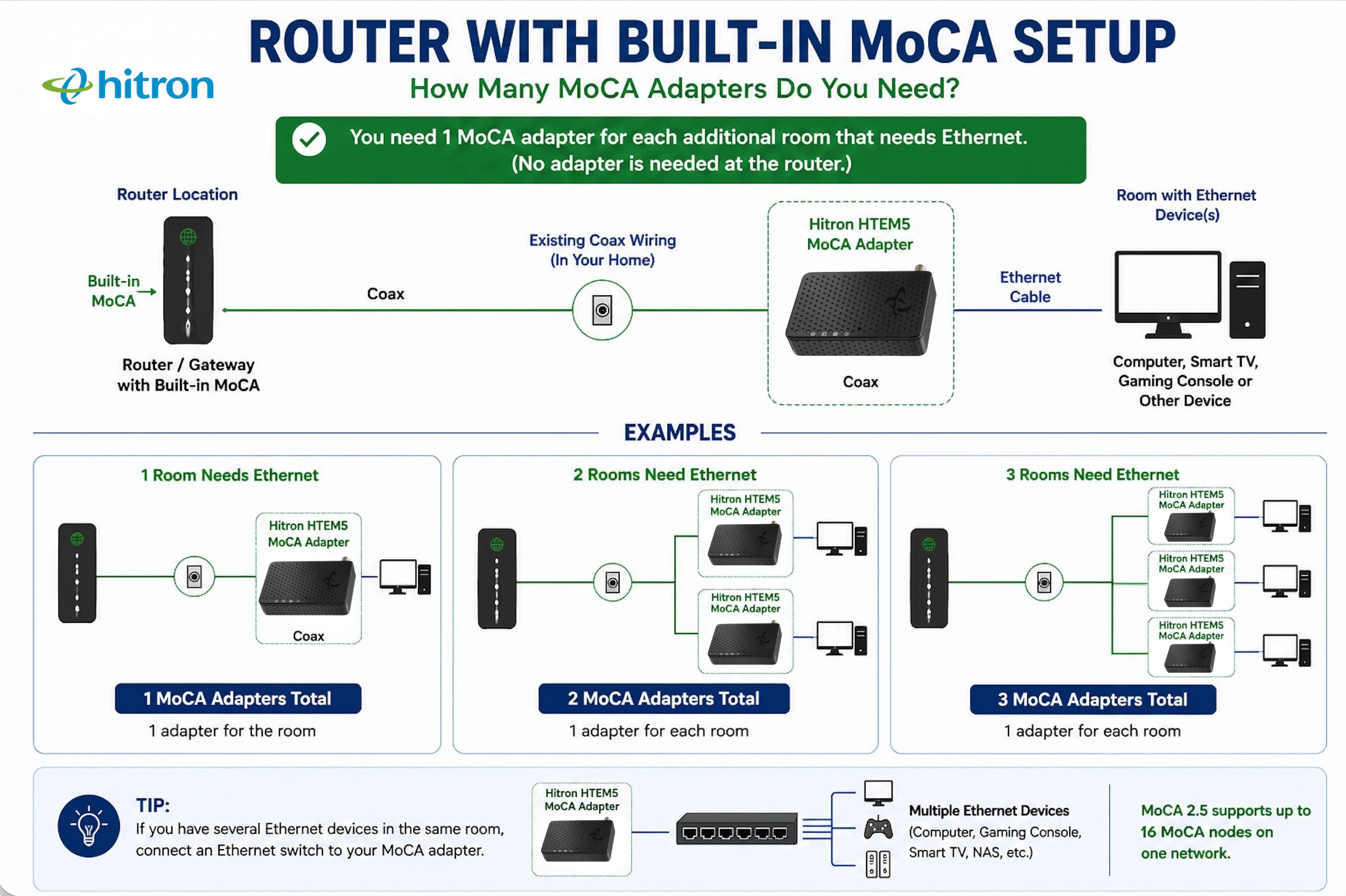
You only need a standalone MoCA adapter at the location where you want Ethernet.
However, built-in MoCA is not a standard feature on most standalone consumer WiFi routers. It is more commonly found in certain gateways supplied by cable companies or Internet Service Providers (ISPs).
That means you should confirm that your equipment supports MoCA before buying only one adapter.
How Can I Tell If My Router Has MoCA?
There are several ways to check whether your router or gateway has MoCA built in.
Check the specifications. Find the model number and check the manufacturer’s specifications or user manual. Look specifically for MoCA, MoCA 2.0, MoCA 2.5 or MoCA LAN.
Check the device settings. Log in to your router or gateway and look for a setting labelled MoCA, Coax or MoCA LAN. On some equipment, MoCA may need to be enabled.
Ask your ISP. If your ISP supplied your gateway, ask whether that specific model supports MoCA and whether the feature is enabled.
Most importantly, do not assume that a coax port means your equipment supports MoCA. Cable modems and gateways use coax to receive Internet service from the cable provider. That does not necessarily mean they can use your home’s coax wiring for a MoCA network.
💡 Tip: If you cannot confirm that your router or gateway has built-in MoCA, plan on using two MoCA adapters.
How Many MoCA Adapters Do I Need for Multiple Rooms?
Once your MoCA network is established, you can add another MoCA adapter at a compatible coax outlet in each additional room where you want Ethernet.
For example, if your router does not have MoCA built in and you want Ethernet in two other rooms, you would typically need three adapters:
You do not need a new pair of adapters for every room. The adapter connected to your router can communicate with the other MoCA adapters on the same coax network.
If your gateway already has MoCA built in, you would not need Adapter #1. You would simply add an adapter at each location where you want Ethernet.
How Many MoCA Adapters Can I Have on My Network?
MoCA is not limited to a two-adapter connection. MoCA 2.5 supports up to 16 MoCA nodes on one network.
A MoCA node is simply a device that communicates directly over your MoCA network. Each standalone MoCA adapter counts as one node. A gateway or another device with built-in MoCA also counts as one node.
For example:
- 1 MoCA-enabled gateway = 1 MoCA node
- 3 MoCA adapters = 3 MoCA nodes
- Total = 4 MoCA nodes
So, a MoCA adapter is a MoCA node, but not every MoCA node has to be a standalone adapter.
For most home networks, the 16-node limit provides plenty of room to expand. The more practical question is usually how many separate locations in your home need Ethernet.
Do I Need a MoCA Adapter for Every Ethernet Device?
No. Think about locations rather than individual devices.
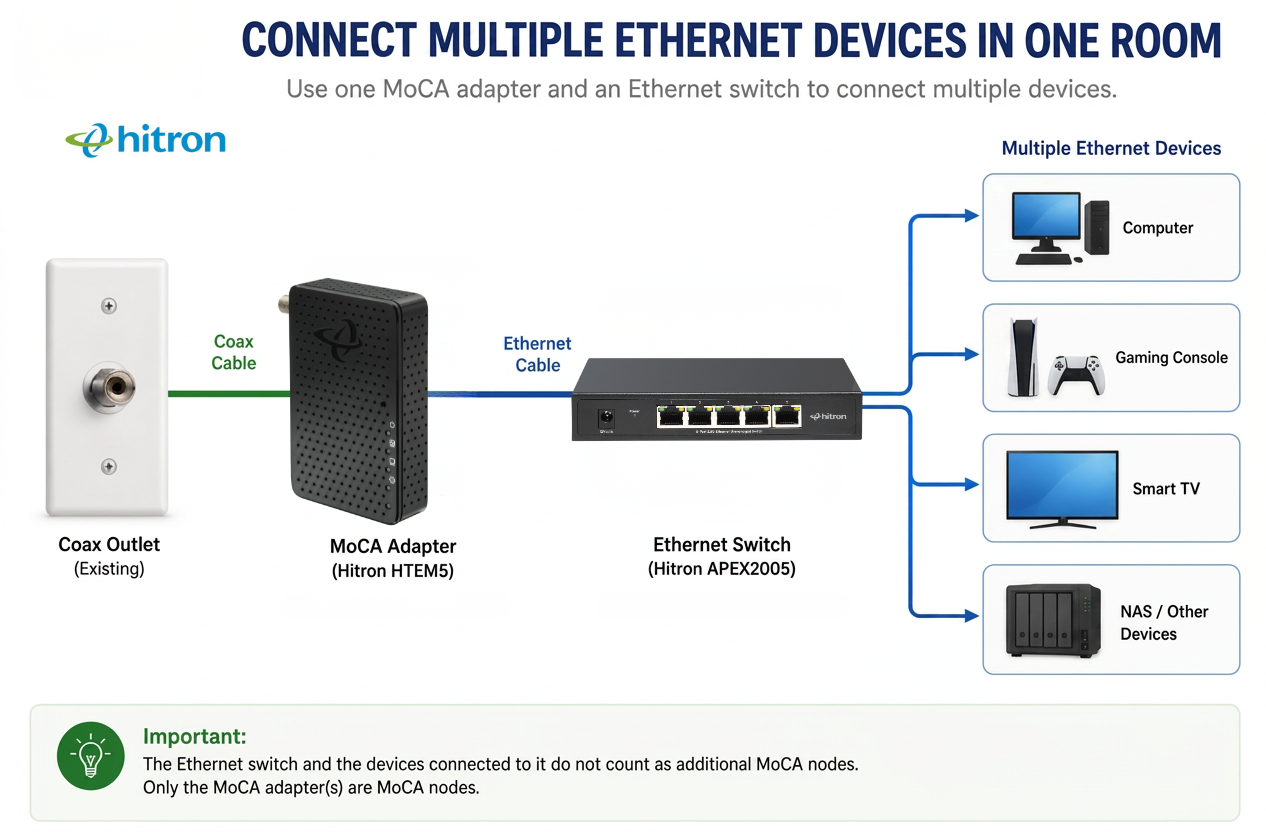
If you have several Ethernet devices in the same room, you can connect an Ethernet switch to one MoCA adapter:
For example, one MoCA adapter and an Ethernet switch could provide wired connections for a gaming console, Smart TV and computer in the same entertainment room.
You do not need three MoCA adapters just because you have three Ethernet devices in that room.
💡 Tip: The Ethernet switch and the devices connected to it do not count as additional MoCA nodes. Only the MoCA adapter is communicating directly over the coax network.
👉 Related: What Is an Ethernet Switch and How Does It Work?
One MoCA Adapter or Two? Use This Quick Guide
Your Setup
MoCA Adapters Typically Needed
A simple way to calculate what you need is:
No built-in MoCA? Start with one adapter at your router.
Then add one adapter for each additional location where you want Ethernet.
So, if you have a standard router and want Ethernet in three other rooms, you would typically need four MoCA adapters.
Before You Buy MoCA Adapters
Once you know how many adapters you need, make sure your home’s coax network can support the connection.
Check that the coax outlets you plan to use are connected, that your coax network and splitters are suitable for MoCA, and whether other services are already using the same coax wiring.
We cover those checks in more detail here:
👉 Related: How to Convert Your Coax Wiring into an Ethernet Connection
FAQs
Can MoCA Work with Just One Adapter?
Yes, but only if another device on your coax network already provides the other MoCA connection. For example, if your gateway has built-in MoCA and it is enabled, you may only need one standalone MoCA adapter in the room where you want Ethernet.
If your router does not support MoCA, one standalone adapter by itself cannot create the complete connection.
Do MoCA Adapters Have to Be Used in Pairs?
You need at least two MoCA-capable devices to establish a MoCA connection, but they do not necessarily have to be two standalone adapters.
The connection could use two MoCA adapters or one MoCA-enabled gateway and one MoCA adapter.
Once that MoCA network exists, you can add more adapters at other compatible coax outlets.
Can I Add More MoCA Adapters Later?
Yes. You can start with two MoCA adapters and add compatible adapters at other coax outlets as you need Ethernet in more areas of your home.
Bring Ethernet to the Rooms Where You Need It
For most homes using a standard router, two MoCA adapters are the place to start. One connects your router to your home’s coax network, and the second provides Ethernet in another room.
From there, you can add another adapter for each additional location where you want a wired connection. If your gateway already has MoCA built in and enabled, you may need one fewer adapter.
The Hitron HTEM5 MoCA 2.5 Adapter lets you use compatible coax wiring already in your home to bring a high-speed wired Ethernet connection to rooms where running new Ethernet cable may be difficult.


