
MoCA adapters can be an easy way to add a fast, reliable wired Ethernet connection to rooms where running new Ethernet cable would be difficult. But before you buy MoCA adapters, check your home’s coax wiring, existing equipment, connection points, and the number of adapters you actually need.
A few minutes of checking your setup before you buy can help you determine whether MoCA is right for your home and avoid buying equipment that will not work with your network.
Here are eight things to check.
1. Do You Have Coax Outlets Where You Need Ethernet?
MoCA, or Multimedia over Coax Alliance, technology uses the coaxial cable already installed in many homes to carry Ethernet data.
That means the first thing to check is simple: Do you have coax outlets in the right places?
For example, you might want a wired connection for a:
- Gaming console
- Desktop computer
- Smart TV
- Streaming device
- WiFi access point
- Home office
If there is a coax outlet near your router and another near the device or room where you want Ethernet, MoCA may let you connect those locations without installing new Ethernet cable.
However, having coax outlets does not automatically mean those outlets are connected to each other. That is the next thing you need to check.
👉 Related: How Does MoCA Work?
2. Are Your Coax Outlets Connected?
For MoCA adapters to communicate, the coax outlets you plan to use need to be part of the same connected coax network.
In many homes, coax cables from different rooms meet at a central splitter or distribution point. If one outlet has been disconnected, goes to a separate coax network, or is connected incorrectly, the MoCA signal may not reach the other adapter.
This can be especially important in older homes where cable or satellite services have been installed, changed, or disconnected over the years.
Before you buy MoCA adapters, check whether the coax outlets you want to use are connected through your home’s coax network.
💡 Tip: If you are not sure where your coax cables go, look for the location where the coax lines from different rooms come together. It may be in a basement, utility room, garage, structured wiring panel, or outside cable box.
3. Is Your Coax Network Compatible with MoCA?
MoCA uses frequencies on your coax wiring to transmit network data. Some components installed on a coax network can interfere with those signals.
Your coax network may include:
- Coax splitters
- Amplifiers
- Filters
- Satellite TV equipment
- Cable TV equipment
- Unused or disconnected coax lines
Older splitters are a common item to check. A splitter may work perfectly well for television signals but not support the frequencies used by MoCA.
If your coax network includes splitters, check their frequency ratings and whether they are designed to support MoCA.
You should also identify any amplifiers or other equipment in the coax path that could prevent MoCA signals from passing between adapters.
4. Do You Have Cable TV, Satellite TV, or Other Services Using the Coax?
Using your coax wiring for another service does not necessarily mean you cannot use MoCA, but you need to know what is already on the network.
MoCA is commonly designed to coexist with compatible cable TV and broadband services because they can operate at different frequencies on the same coax wiring.
Satellite systems can be different. Some satellite equipment uses frequencies that overlap with MoCA or uses network components that may prevent a standard MoCA installation from working correctly.
Before buying adapters, identify what your coax network currently carries.
If you are unsure, check with your service provider or equipment manufacturer before changing the coax network.
5. Does Your Modem or Router Already Have MoCA Built In?
This is easy to overlook, and it can affect how many MoCA adapters you need.
Some gateways, routers, and other networking devices have built-in MoCA capability. If MoCA is already enabled at the router side of your network, you may only need one MoCA adapter at the room where you want an Ethernet connection.
If your router or gateway does not have built-in MoCA, you will typically need at least two adapters:
Standard Router Setup
How Many MoCA Adapters Do You Need?
You need 1 MoCA adapter at your router + 1 MoCA adapter for each additional room that needs Ethernet.
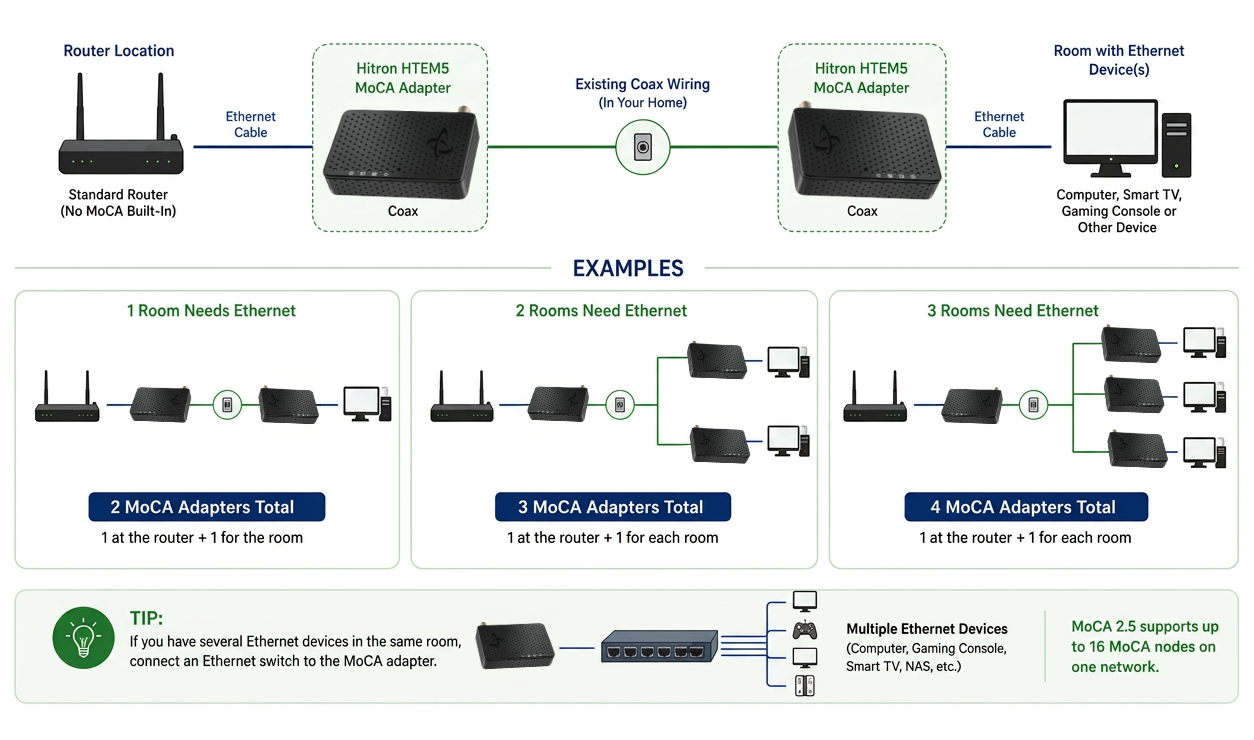
The first adapter converts Ethernet to a MoCA signal that can travel over the coax wiring. The second converts that signal back to Ethernet.
Checking your existing equipment first can prevent you from buying more adapters than you need.
6. Do You Need a MoCA Point of Entry (PoE) Filter?
A MoCA Point of Entry (PoE) filter is a small coax device typically installed where the incoming coax line enters the home’s coax network.
Its job is to help keep MoCA signals contained within your home’s coax network rather than allowing those signals to travel beyond it. A properly installed filter can also help improve the performance of the MoCA network in some installations.
If your home uses coax connected to an outside cable provider network, check whether a MoCA filter is already installed and whether one is required for your setup.
The typical location is:
Coax Network with MoCA PoE Filter
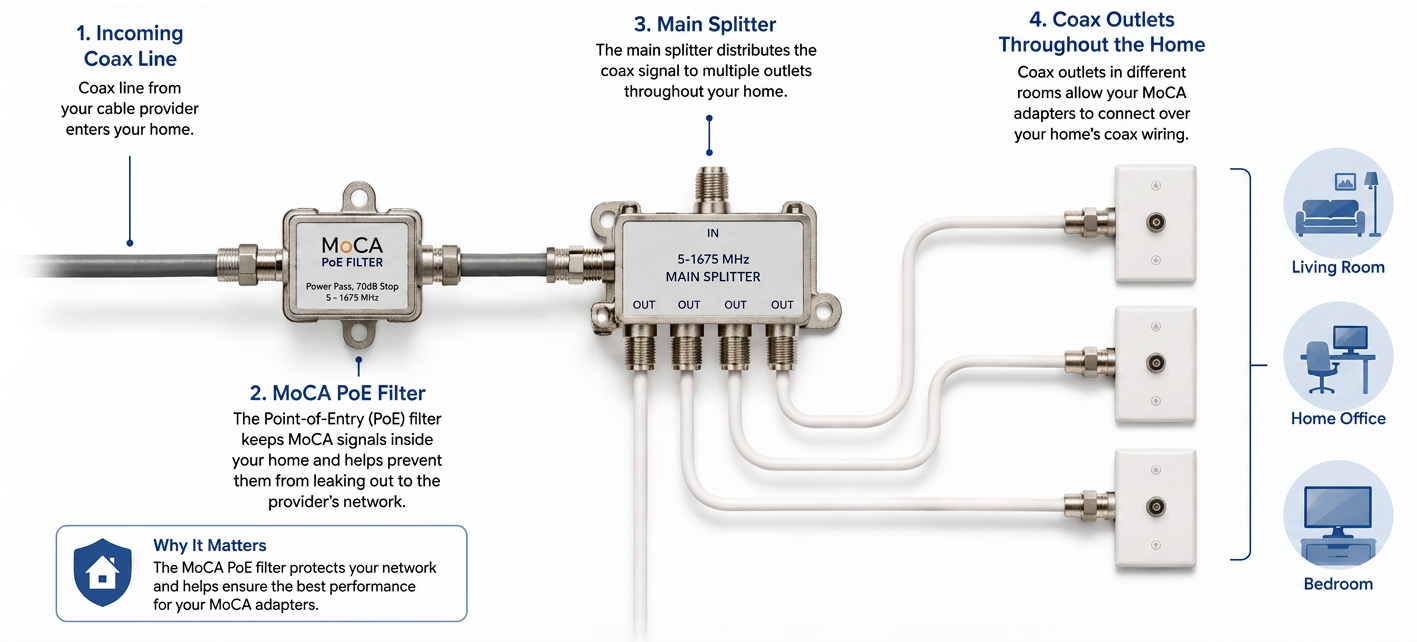
If you are unsure, check your existing coax installation or ask your cable provider before making changes to the incoming cable line.
💡 Tip: Do not confuse a MoCA Point of Entry filter with Power over Ethernet, which is also commonly abbreviated as PoE. They are completely different networking technologies.
7. How Many Rooms Do You Want to Connect?
Think beyond the first room you want to connect.
If your immediate goal is simply to get wired Ethernet to a home office, gaming setup, or Smart TV, a basic MoCA connection may be all you need.
But MoCA can also be used to create wired network connections in several rooms, provided those rooms have compatible coax connections.
For example:
Standard Router Setup
How Many MoCA Adapters Do You Need?
You need 1 MoCA adapter at your router + 1 MoCA adapter for each additional room that needs Ethernet.
Knowing how many locations you ultimately want to connect can help you determine how many adapters you need and whether your coax network is set up to support them.
You can also connect an Ethernet switch to a MoCA adapter if you need multiple Ethernet ports in one room.
8. What Ethernet Speed Does the MoCA Adapter Support?
Not all MoCA adapters offer the same networking capabilities.
When comparing adapters, look at both the MoCA version and the Ethernet port speed.
MoCA 2.5 technology supports up to 2.5 Gbps of shared network throughput over compatible coax wiring. But the Ethernet connection on the adapter also matters.
For example, an adapter with a Gigabit Ethernet port can connect to Ethernet devices at up to 1 Gbps, while an adapter with a 2.5 Gigabit Ethernet port can support faster wired connections when the rest of your network equipment also supports those speeds.
The Hitron HTEM5 uses MoCA 2.5 technology and a 2.5 Gigabit Ethernet port, making it suitable for home networks that need high-speed wired connectivity over existing coax wiring.
Remember that your actual network performance will depend on your internet plan, connected devices, coax network, Ethernet equipment, and other conditions. A MoCA adapter does not increase the speed supplied by your Internet Service Provider.
A Quick MoCA Check Before You Buy
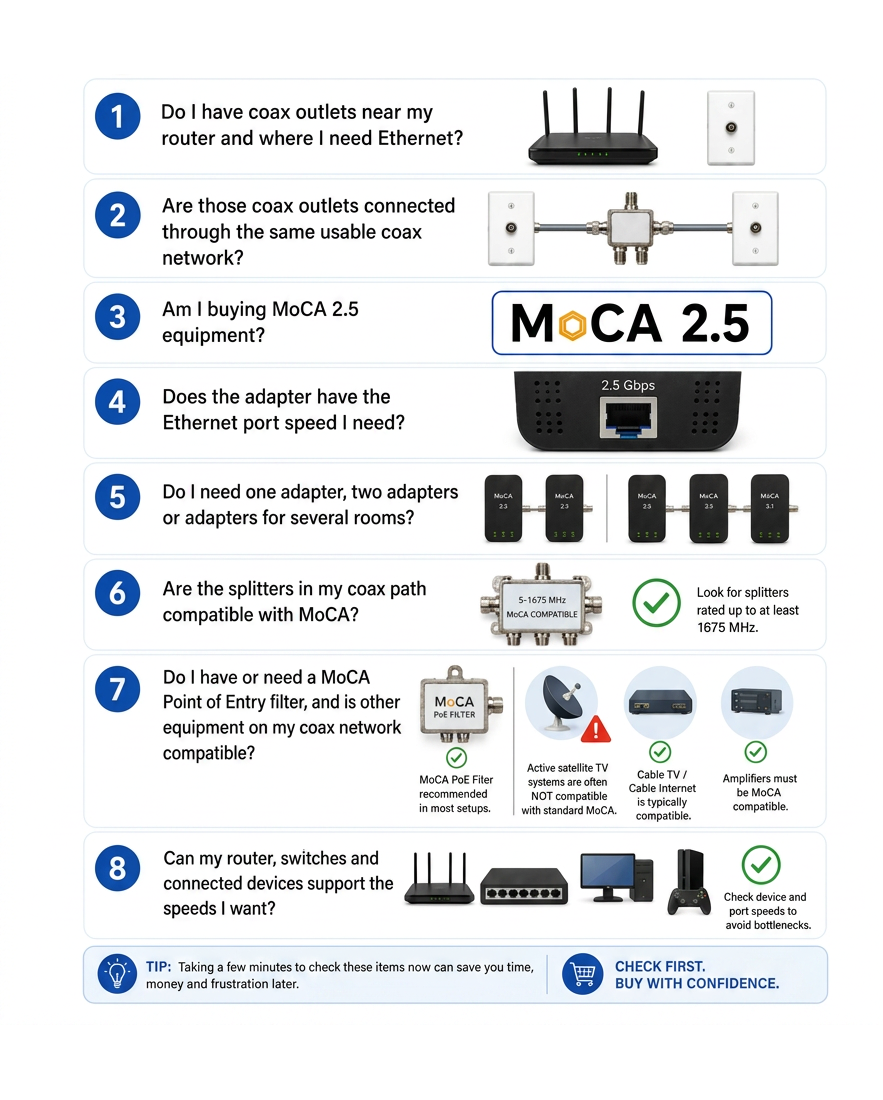
Before ordering MoCA adapters, make sure you can answer yes to the most important questions:
- Do I have coax outlets near my router and where I need Ethernet?
- Are those coax outlets connected through the same usable coax network?
- Am I buying MoCA 2.5 equipment?
- Does the adapter have the Ethernet port speed I need?
- Do I need one adapter, two adapters or adapters for several rooms?
- Are the splitters in my coax path compatible with MoCA?
- Do I have or need a MoCA Point of Entry filter, and is other equipment on my coax network compatible?
- Can my router, switches and connected devices support the speeds I want?
If you cannot answer one or more of these questions yet, check your home network before buying. MoCA works best when you understand what is already connected to your coax wiring and what equipment sits between the outlets you plan to use.
Before Buying MoCA Adapters:
8 Important things to check before you buy.
Make Sure MoCA Is Right for Your Home
MoCA can turn existing coax wiring into a fast wired network connection without the work of running new Ethernet cable through your home. The key is making sure your coax network and existing equipment are compatible before you buy.
Hitron’s HTEM5 MoCA 2.5 Adapter provides up to 2.5 Gbps MoCA network throughput and a 2.5 Gigabit Ethernet connection, giving compatible homes a simple way to extend wired Ethernet using existing coax wiring.
Before purchasing, check your coax outlets, network equipment, splitters, existing services, and the number of adapters your setup requires. Once you know your home is MoCA-ready, you can choose the right equipment with greater confidence.
Learn more about the Hitron HTEM5 MoCA 2.5 Adapter and see whether it fits your home network setup.


