
If you’re thinking about using MoCA adapters to get a faster, more reliable wired Internet connection in another room, one question matters before you buy:
Will MoCA work in my house?
In many homes, the answer is yes. MoCA can work if your home has existing coaxial cable wiring between the rooms you want to connect and that coax network is compatible with MoCA signals. You do not need active cable TV service, but your coax outlets need to be connected, and certain splitters, amplifiers, satellite systems, or other equipment can affect compatibility.
Before buying MoCA adapters, check these seven things.
1. Do You Have Coax Outlets in the Rooms You Want to Connect?
Start with the simplest question: Does your home already have coaxial cable outlets?
Coax outlets are the round, threaded connectors traditionally used for cable TV and cable Internet.
For a typical MoCA setup, you need access to coax near:
- Your router or an Ethernet connection to your router
- The device or room where you want a wired Ethernet connection
For example, you might have your router in the living room and want Ethernet in a basement office. If both rooms have connected coax outlets, MoCA may allow you to use that existing wiring instead of installing a new Ethernet cable between the rooms.
Having coax outlets, however, does not automatically mean those outlets are connected to each other.
That brings us to the next check.
2. Are Your Coax Outlets Actually Connected?
Two coax wall outlets can look identical but lead to completely different places.
Older homes may have coax wiring that has been disconnected, rerouted, or abandoned during renovations. Previous homeowners or service technicians may also have changed how the home’s coax network is connected.
MoCA adapters need a continuous coax path between them.
If one outlet terminates in an unused cable or the two outlets are on separate coax networks, the adapters may not be able to communicate.
Look for your home’s coax distribution point, which may be located in a:
- Basement
- Utility room
- Structured wiring panel
- Garage
- Exterior cable box
You may see several coax cables connected through a splitter.
💡 Tip: Don’t assume an outlet works simply because it’s installed in the wall. Confirming how your coax outlets are connected before purchasing can prevent one of the most common MoCA setup problems.
3. Do You Need One MoCA Adapter or Two?
This is one of the most important things to understand before buying.
A MoCA connection normally requires a MoCA device at both ends of the coax connection.
A typical setup looks like this:
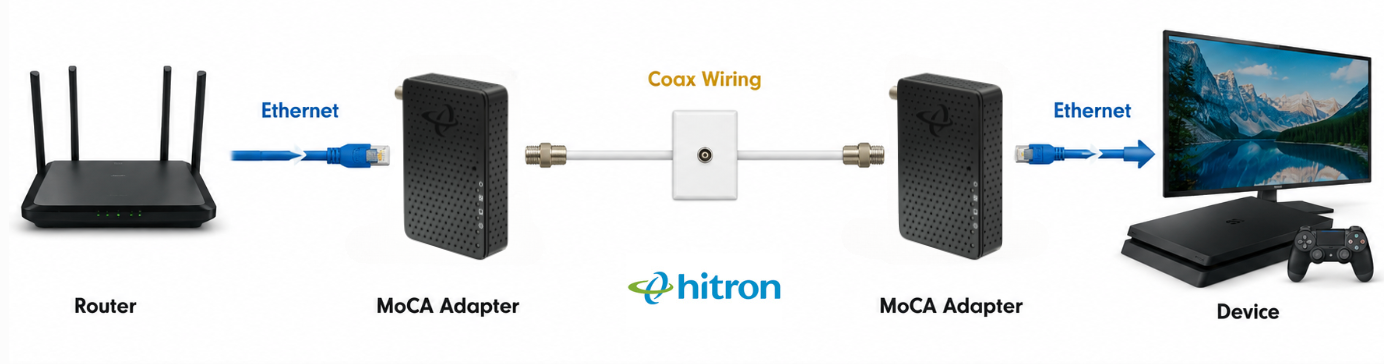
However, some cable gateways and networking equipment already have MoCA built in. If your gateway provides compatible MoCA networking, you may only need one additional adapter at the other end.
If your modem or router does not have MoCA built in, you will generally need two MoCA adapters to create the connection.
Before buying, check your gateway or router specifications rather than assuming it supports MoCA.
👉 Related: What Is a MoCA Adapter and How Does It Work?
4. Are Your Coax Splitters Compatible with MoCA?
Your home’s coax network may use splitters to distribute the signal to several rooms.
Not every splitter is ideal for MoCA.
MoCA uses higher frequencies than some traditional cable TV systems, so older splitters may weaken or block the frequencies MoCA needs to communicate reliably.
Check the frequency range printed on your coax splitters. For MoCA 2.5 networks, MoCA-compatible splitters rated to support frequencies up to approximately 1675 MHz are typically recommended.
If your home has older splitters, replacing them with MoCA-compatible models can often resolve connectivity or performance problems.
Also avoid adding unnecessary splitters. Every additional split can introduce signal loss.
💡 Tip: If your coax wiring looks complicated, identify which cables actually serve the rooms you want to connect. Simplifying the coax path can help improve MoCA performance.
5. Is There an Amplifier on Your Coax Network?
Some homes use coax amplifiers to improve cable TV signals across long cable runs or multiple outlets.
The problem is that some traditional coax amplifiers do not pass MoCA frequencies correctly.
If an amplifier sits between the two coax outlets you’re trying to use, your MoCA adapters may not be able to communicate through it.
Look for equipment labelled as a coax, cable TV, or distribution amplifier near your home’s main coax splitter.
If you find one, check whether it specifically supports MoCA.
A MoCA-compatible amplifier may work correctly, while an older one may need to be bypassed or replaced depending on your home’s setup.
6. Do You Have Satellite TV or Other Services Using the Coax?
MoCA can share coax wiring with many cable TV and cable Internet installations because the technologies are designed to operate at different frequencies.
Satellite systems can be different.
Some satellite TV technologies use frequencies that overlap with the frequencies used by MoCA. That can create compatibility problems.
If your home’s coax is currently being used for satellite TV, don’t assume that a standard MoCA adapter can simply be connected to the same wiring.
You should first identify:
- Which service is using the coax
- Whether the coax is still connected to satellite equipment
- Whether the existing equipment is compatible with MoCA
- Whether a separate unused coax run is available
This is especially important when moving into a home where you don’t know how the previous owner used the coax wiring.
7. Do You Need a MoCA Point-of-Entry Filter?
A MoCA Point-of-Entry (PoE) filter is a small coax device installed where the cable provider’s coax line enters the home’s coax network.
Its job is to help keep MoCA signals contained within your home rather than allowing them to travel back onto the provider’s coax network. It can also help improve the MoCA network’s signal characteristics.
If your coax network is connected to an external cable provider, check whether a MoCA-compatible Point-of-Entry filter is already installed.
If your coax network is completely isolated and is being used only as an internal network between your MoCA adapters, a Point-of-Entry filter may not be necessary.
💡 Tip: A MoCA Point-of-Entry filter is different from Power over Ethernet, which is also commonly abbreviated as PoE. In this context, PoE means Point of Entry.
A Quick MoCA Compatibility Checklist
Before buying MoCA adapters, confirm that:
- You have coax outlets near the locations you want to connect.
- Those coax outlets are connected to the same coax network.
- You know whether your modem, gateway, or router already supports MoCA.
- You know whether you need one adapter or two.
- Your coax splitters support MoCA frequencies.
- Any coax amplifiers in the signal path are MoCA compatible.
- Your coax is not being used by an incompatible satellite system.
- You have checked whether your setup requires a MoCA Point-of-Entry filter.
If you can answer these questions before ordering your equipment, you’ll have a much better idea whether MoCA is the right solution for your home.
What Can You Connect with MoCA?
Once you establish a MoCA connection, the Ethernet port on the adapter can provide a wired network connection in a room where running new Ethernet cable may be difficult.
That can make MoCA useful for connecting:
- Desktop computers
- Gaming consoles
- Smart TVs
- Streaming devices
- WiFi access points
- Ethernet switches
- Home office equipment
For example, if you need Ethernet for several devices in one room, you can connect a MoCA adapter to a compatible Ethernet switch and expand that single MoCA connection to multiple wired devices.
When Does MoCA Make the Most Sense?
MoCA is particularly useful when you want the reliability of a wired Ethernet connection but don’t want to run new Ethernet cable through walls, floors, or finished areas of your home.
It can be a good option when:
- WiFi performance is poor in a basement or distant room.
- Your gaming console or PC is too far from the router for Ethernet.
- You want a wired connection for a home office.
- Your smart TV or streaming device experiences unreliable WiFi.
- Your home already has coax installed in useful locations.
MoCA does not replace your modem or router. Instead, it extends your existing home network over coax wiring that’s already in the house.
Using the Hitron HTEM5 for Ethernet Over Coax
If your home passes the compatibility checks above, the Hitron HTEM5 MoCA 2.5 Adapter can turn compatible existing coax wiring into a high-speed Ethernet connection without requiring you to install new Ethernet cable through your home.
The HTEM5 supports MoCA 2.5 networking and a 2.5 Gigabit Ethernet connection, making it useful for extending wired connectivity to home offices, gaming systems, streaming devices, WiFi access points, or Ethernet switches.
Remember that if your existing modem or gateway does not have compatible MoCA built in, you’ll typically need two HTEM5 adapters, one at each end of the coax connection.
Learn more about the Hitron HTEM5 MoCA 2.5 Adapter.
FAQs
Will MoCA work in any house with coax?
Do I need cable TV service for MoCA to work?
How do I know if my router already has MoCA?
Can I use MoCA if I have cable Internet?
How many MoCA adapters do I need?
Check Your Coax Before You Buy
MoCA can be one of the easiest ways to bring a fast wired network connection to another part of your home, but checking your coax setup first can save you from buying equipment that won’t work with your existing wiring.
Start by confirming that your coax outlets are connected. Then check your splitters, amplifiers, existing MoCA equipment, satellite services, and Point-of-Entry setup.
Once you know your home’s coax network is MoCA-ready, you can choose the right number of adapters for your setup and avoid many of the compatibility problems that lead to installation frustration.
Want to use the coax already in your home for a wired Ethernet connection? Learn more about the Hitron HTEM5 MoCA 2.5 Adapter and see whether it’s right for your home.


