
Yes. You can use MoCA Adapters with a Fiber Modem or fiber Internet connection, as long as your router has an available Ethernet port and your home has compatible coax wiring.
MoCA does not depend on cable Internet service. It uses the coax cables already inside your home to create a wired Ethernet connection between rooms. That means MoCA can work with fiber, cable and many other types of Internet service.
With fiber Internet, the important connection is typically between your router and the first MoCA Adapter, not directly to the fiber line.
How Does MoCA Work with Fiber Internet?
A fiber Internet connection usually enters your home through an Optical Network Terminal (ONT). The ONT converts the optical fiber signal into a connection that your router can use.
Your home network may look like this:
MoCA Fiber Internet
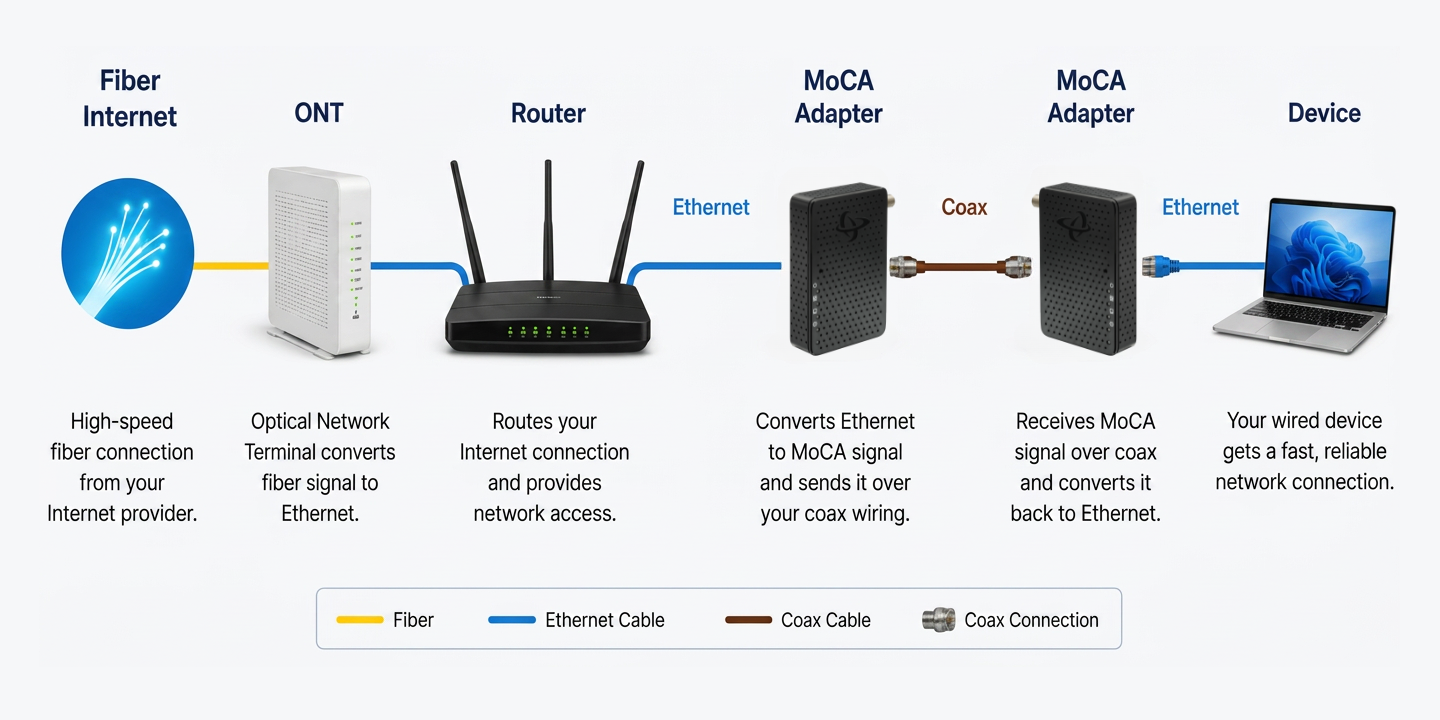
The first MoCA Adapter connects to an Ethernet LAN port on your router and to your home’s coax network.
A second MoCA Adapter connects to a coax outlet in another room. From there, an Ethernet cable connects the adapter to a computer, gaming console, smart TV, Ethernet switch, WiFi access point or other Ethernet device.
The Multimedia over Coax Alliance specifically supports using existing coax as part of fiber broadband networks, including connections between ONTs, gateways and other networking equipment.
Do I Connect a MoCA Adapter to My Fiber Modem or ONT?
Usually, no.
For a typical home MoCA network, connect the MoCA Adapter to a LAN Ethernet port on your router.
Think of the devices as performing different jobs:
ONT: Brings your fiber Internet service into the home.
Router: Creates and manages your home network.
MoCA Adapter: Converts Ethernet from your router into a signal that can travel over your home’s coax wiring.
At the other end of the coax connection, another MoCA Adapter converts that signal back to Ethernet.
Some fiber gateways and ONTs may have MoCA technology built in. MoCA-certified fiber gateways and ONTs have existed for years, so your exact setup can depend on the equipment supplied by your Internet provider.
💡 Tip: Before buying MoCA Adapters, check whether your ISP-provided router or gateway already has MoCA built in. If it does, you may only need one MoCA Adapter at the location where you want Ethernet.
Why Would You Use MoCA If You Already Have Fiber?
Fiber can provide an extremely fast Internet connection to your home, but it does not automatically provide a wired connection to every room.
Once the Internet connection reaches your router, your devices still need a way to connect to it.
WiFi may work well in many areas of the home, but distance, walls, floors and other obstacles can affect the wireless connection.
If your home already has coax outlets, MoCA lets you use that wiring to extend your wired network without installing Ethernet cable through walls.
This can be especially useful for:
- Home offices
- Gaming consoles
- Smart TVs and streaming devices
- WiFi access points
- Ethernet switches
- Rooms where WiFi performance is inconsistent
Will MoCA Slow Down My Fiber Internet?
MoCA should not slow down your fiber Internet connection, but your MoCA connection cannot be faster than the equipment and connections supporting it.
The speed a device receives depends on several parts of your home network, including your Internet plan, router Ethernet ports, MoCA Adapters, coax wiring and the Ethernet capability of the connected device.
For example, if your fiber plan provides multi-Gig speeds but one of the Ethernet ports in the connection supports only 1 Gbps, that port can limit the speed available to the connected device.
If you are buying new MoCA equipment, choose MoCA 2.5. MoCA 2.5 supports up to 2.5 Gbps of shared throughput over compatible coax wiring, making it better suited to Gigabit and multi-Gig home networks.
💡 Tip: Check the Ethernet port speed on the MoCA Adapter, not just the MoCA version. A MoCA 2.5 Adapter with a 2.5 GbE port can support faster Ethernet connections than an adapter limited to a 1 GbE port.
Does Your Coax Wiring Need to Be Connected to the Fiber ONT?
No. Your home’s coax wiring does not normally need to carry the fiber Internet signal for you to use it as a MoCA network.
The coax is being used as the wired connection inside your home.
The router provides the network connection to the first MoCA Adapter through Ethernet. The MoCA Adapters then use the home’s coax wiring to carry network data between locations.
This distinction is important because many homeowners assume MoCA only works when their Internet provider delivers Internet over coax.
It doesn’t.
Your Internet can arrive over fiber while MoCA uses coax strictly for networking inside the home.
What Do You Need to Use MoCA with Fiber?
For a typical fiber setup, you will need:
- A router with an available Ethernet LAN port
- Compatible coax outlets near the router and where you want the wired connection
- MoCA Adapters, unless your router or gateway already has MoCA built in
- MoCA-compatible splitters if splitters are part of the coax path
- Ethernet and coax cables needed to make the connections
The coax outlets also need to be connected through the same usable coax network.
Old splitters, disconnected coax runs, amplifiers or other equipment in the coax path can prevent MoCA devices from communicating properly.
Do You Need a MoCA Point of Entry Filter with Fiber?
Not necessarily.
A MoCA Point of Entry (PoE) filter is commonly used on cable-connected coax networks to keep MoCA signals contained within the home’s coax network.
With fiber Internet, your home’s coax network may no longer be connected to an outside cable provider network. If the coax network is completely isolated inside the home, the usual need to prevent the MoCA signal from leaving the property may not apply.
However, every coax installation is different. Before adding or removing filters, determine where the coax cables connect and whether the home’s coax network still connects to an external cable line or other equipment.
MoCA Can Help Extend Your Fiber Connection Around Your Home
Upgrading to fiber can give your home a faster connection to the Internet. The next challenge is getting that connection to the devices that need it.
If your home already has coax wiring, Hitron HTEM5 MoCA 2.5 Adapters can help turn compatible coax outlets into wired Ethernet connections without running new Ethernet cable through your walls.
Connect an HTEM5 to your router and coax network, then use another HTEM5 at a compatible coax outlet where you need Ethernet.
Use the wiring you already have to bring a wired connection to more of your home.


