
WiFi 7 is the newest generation of wireless technology, promising faster speeds, lower latency, and better performance for homes with more connected devices than ever before.
If your internet feels slow, upgrading to a WiFi 7 router may seem like the obvious solution. But a newer WiFi standard doesn’t automatically create a faster home network. Here’s the reality: your WiFi router is only one part of your home network.
Your internet experience depends on every part of your network working together, including your internet plan, modem or ONT, router, WiFi coverage, Ethernet connections, and connected devices.
If one part of your network becomes a bottleneck, upgrading another component may not improve performance.
The key to a faster home network is not simply buying the newest technology. It’s understanding where performance is being limited and choosing the upgrade that addresses the actual problem.
Your Home Network Is More Than Your WiFi Router
When most people think about their home internet, they usually think about one device: the WiFi router.
It’s easy to understand why.
The router is the device with antennas. It’s what connects phones, laptops, and smart home devices to the internet.
However, your router is only one part of a much larger system.
A typical home network looks like this:
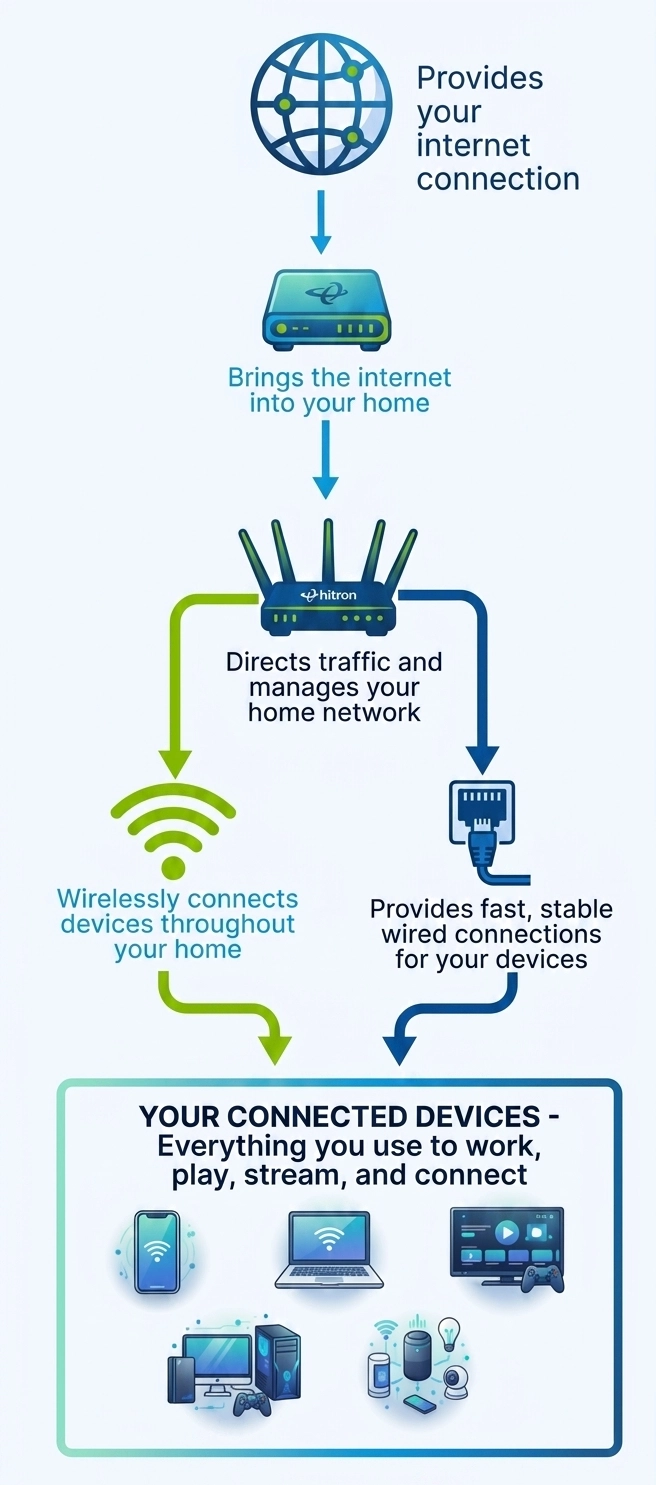
Each component has a specific role.
Your Internet Service Provider delivers the internet connection to your home.
Your modem or ONT receives that connection and converts it into a network connection your equipment can use.
Your router manages traffic and creates your home network.
WiFi provides wireless connectivity for mobile devices.
Ethernet provides dedicated wired connections for devices that need consistent performance.
If one part of this system cannot keep up, it affects the experience across your entire network.
Why Your WiFi Router Isn’t Always the Problem
One of the biggest misconceptions about home networking is that the WiFi router controls everything.
It does not.
Your router can only work with the connection it receives and the devices connected to it.
For example:
- A faster router cannot increase the speed of your internet plan.
- A new WiFi standard cannot fix an outdated modem.
- A powerful router cannot eliminate every obstacle inside your home.
- A WiFi upgrade cannot replace a wired connection for devices that need maximum consistency.
This is why two homes with the same internet plan and the same WiFi router can have very different experiences.
One home may have:
- A centrally located router.
- Wired connections for high-performance devices.
- Devices positioned close to strong WiFi coverage.
Another home may have:
- A router hidden in a basement.
- Multiple devices competing for wireless bandwidth.
- Important devices relying on weak WiFi signals.
The equipment matters, but how the network is designed matters just as much.
Will WiFi 7 Make Your Internet Faster?
The short answer is: not always.
WiFi 7 improves the wireless connection between your router and compatible devices. It does not increase the speed delivered by your Internet Service Provider.
For example, if your internet plan provides 500 Mbps, a WiFi 7 router cannot turn that into a 2 Gigabit connection.
Your router can only distribute the bandwidth that reaches your home.
However, WiFi 7 can improve how efficiently that bandwidth is shared between devices.
This can make a noticeable difference in homes where:
- Multiple people are streaming at the same time.
- Several devices are active simultaneously.
- Wireless congestion affects performance.
- Compatible WiFi 7 devices are being used.
The difference is important:
WiFi 7 can improve your wireless experience. It cannot increase the internet speed you purchase from your ISP.
Internet Speed and Network Speed Are Different
One reason home networking can be confusing is that people often use “internet speed” and “network speed” to describe the same thing.
They are not the same.
Internet speed is the connection coming into your home from your Internet Service Provider.
Network speed is how quickly devices communicate within your home.
For example:
A family may have a fast internet plan that supports multiple 4K streams. However, a desktop computer transferring large files to a Network Attached Storage (NAS) device depends on the speed of the home network itself.
That local connection may be limited by:
- Older Ethernet equipment.
- Wireless congestion.
- Device capabilities.
- Network configuration.
Understanding this difference helps explain why a faster WiFi router does not always solve every performance problem.
What WiFi 7 Can Do
WiFi 7 is designed to make wireless networking faster, more efficient, and better equipped to handle the demands of modern homes.
Some of the biggest improvements include:
Higher Wireless Capacity
Every generation of WiFi improves how much data can move across a wireless connection.
WiFi 7 introduces technologies designed to increase wireless performance, including:
- Wider wireless channels
- More efficient data transmission
- Multi-Link Operation (MLO)
These improvements allow compatible devices to communicate more efficiently and can help reduce congestion when many devices are connected at the same time.
For households with multiple people streaming, gaming, working remotely, and using smart home devices, better wireless efficiency can create a smoother experience.
However, improved WiFi performance does not replace the need for a properly designed home network.
Better Performance for Homes with Many Devices
The number of connected devices in homes continues to grow.
A household that once connected a few computers and smartphones may now have:
- Multiple smart TVs
- Gaming consoles
- Streaming devices
- Home office equipment
- Security cameras
- Smart speakers
- Smart home devices
Every connected device shares network resources.
WiFi 7 is designed to handle this increased demand more efficiently, helping compatible devices communicate more effectively when the network is busy.
However, as more devices are added, the rest of your network becomes increasingly important.
A faster wireless connection cannot solve every performance issue if the bottleneck exists somewhere else.
Will WiFi 7 Improve Latency?
For many activities, speed is not the only measurement that matters.
Latency is the time it takes for data to travel between two points.
Lower latency creates a more responsive experience, which is especially important for:
- Online gaming
- Video conferencing
- Voice calls
- Cloud applications
WiFi 7 can help reduce wireless latency through improvements such as Multi-Link Operation and more efficient traffic management.
However, latency is influenced by many parts of your network.
High latency can also be caused by:
- Your Internet Service Provider
- Internet routing
- Distance to a game server
- VPN connections
- Network congestion
- Weak wireless signals
This is why upgrading to WiFi 7 may improve latency in some situations, but it is not a guaranteed solution for every lag or delay problem.
Why WiFi 7 Does Not Replace Ethernet
As WiFi technology continues to improve, many people assume Ethernet is becoming unnecessary.
The opposite is often true.
The fastest home networks use both WiFi and Ethernet because they solve different problems.
WiFi provides flexibility.
It allows people to move throughout their home with smartphones, tablets, and laptops without being connected by a cable.
Ethernet provides consistency.
It creates a dedicated connection for devices where performance, stability, and low latency matter most.
Ethernet remains the preferred choice for:
- Gaming PCs
- Gaming consoles
- Desktop computers
- Network Attached Storage (NAS)
- Home office workstations
- Large file transfers
These devices often benefit from a direct connection because they are less affected by:
- Wireless interference
- Distance from the router
- Walls and obstacles
- Other devices competing for wireless bandwidth
It is about using each technology where it works best.
Why Your Wired Network Matters
Many homeowners focus only on the speed coming into their home.
But the connection inside your home matters just as much.
A multi-gigabit internet plan is only useful if the equipment distributing that connection can support those speeds.
For example:
- A router with limited Ethernet ports may prevent you from connecting all your important devices.
- Older Ethernet equipment may limit performance for newer devices.
- Devices relying only on WiFi may experience congestion when many devices are active.
This is why many modern home networks use a combination of wireless and wired connections.
The goal is not to connect every device with Ethernet.
The goal is to connect the devices that benefit most from Ethernet while allowing WiFi to handle devices that need mobility.
Solving the Right Problem
Before replacing your WiFi router, identify what problem you are actually trying to solve.
If Your Internet Is Slow Everywhere
Check:
- Your internet plan
- Your modem or ONT
- Your service provider connection
A faster WiFi router may not solve the problem.
If WiFi Is Slow in Certain Rooms
Consider:
- Router placement
- Improving WiFi coverage
- Using wired connections to improve network layout
A stronger wireless signal may solve the issue, but the solution depends on why coverage is poor.
If Gaming or Video Calls Are Inconsistent
Consider:
- Ethernet connections
- Reducing wireless congestion
- Improving network stability
Devices that require consistent performance often benefit from a wired connection.
If You Have More Wired Devices Than Ethernet Ports
Consider adding an Ethernet switch.
Many routers only include a limited number of Ethernet ports.
As homes add more wired devices, an Ethernet switch provides an easy way to expand your network without replacing your router.
For example, a switch can allow you to connect:
- Gaming consoles
- Desktop computers
- Smart TVs
- Home office equipment
- Network storage
while continuing to use your existing router.
FAQs
Will WiFi 7 fix slow internet speeds?
Why didn't my new WiFi 7 router make my internet faster?
Will WiFi 7 improve gaming performance?
It can improve gaming performance when wireless congestion or WiFi limitations are contributing to the problem.
WiFi 7 can help reduce wireless delays and improve efficiency for compatible devices.
However, gaming performance also depends on:
- Internet latency
- Game server location
- Network congestion
- Device performance
For the most consistent gaming experience, many gamers continue to use Ethernet because it provides a dedicated connection with less interference and more predictable performance.
Is Ethernet still better than WiFi?
WiFi is ideal for devices that need mobility, such as smartphones, tablets, and laptops.
Ethernet is ideal for devices where consistent performance matters most, including:
- Gaming consoles
- Desktop computers
- Home office equipment
- Network storage
- Streaming devices
The best home networks use both technologies together. Using an Ethernet Switch to connect more wired devices to your wired network creates a strong home network.
Do I need an Ethernet switch?
You may benefit from an Ethernet switch if your router does not have enough Ethernet ports for the devices you want to connect.
Common examples include homes with:
- Multiple gaming consoles
- Desktop computers
- Smart TVs
- Home office equipment
- Network Attached Storage (NAS)
An Ethernet switch expands your wired network by adding more Ethernet connections while allowing you to continue using your existing router.
Building a Home Network That Is Ready for the Future
The biggest lesson when upgrading your home network is that the newest technology is not always the answer.
WiFi 7 can provide meaningful improvements, but your overall experience depends on how every part of your network works together.
A well-designed home network considers:
- The internet speed coming into your home
- The capability of your modem or ONT
- The placement and performance of your router
- Which devices need WiFi flexibility
- Which devices benefit from Ethernet
- How easily your network can grow as you add more connected devices
As homes become more connected, the difference between a basic network and a well-designed network becomes more noticeable.
The goal is not simply to have the newest WiFi technology.
Looking Beyond WiFi
A faster WiFi standard can improve wireless performance, but it is only one part of creating a high-performing home network.
When performance problems occur, the solution is often not replacing your router. It may involve improving another part of your network, such as upgrading your modem, improving coverage, connecting important devices with Ethernet, or expanding your wired network.
Understanding how each part of your network works together helps you make smarter decisions and avoid unnecessary upgrades.
If you are adding more wired devices or running out of Ethernet ports on your router, an Ethernet switch may be the next step in improving your home network.
Read our guide, What Is an Ethernet Switch and How Does It Work?, to learn how Ethernet switches expand your wired network, when you need one, and how they help provide fast, consistent connections for the devices that matter most.


