
Most people blame their Internet provider when WiFi performance drops upstairs.
The reality is often very different.
Your Internet connection may be working perfectly, but the WiFi signal inside your home is struggling to reach where you need it.
If you’ve ever noticed that Netflix buffers in an upstairs bedroom, video calls freeze in your home office, or your phone drops from full bars to one bar when you walk upstairs, you’re experiencing one of the most common home networking challenges.
Understanding why this happens can help you choose the right solution.
Your Internet and Your WiFi Are Not the Same Thing
One of the biggest misconceptions homeowners have is assuming WiFi and Internet service are identical.
They are actually two separate parts of your network.
Your Internet service brings data into your home.
Your WiFi network distributes that connection throughout your house.
You can have a fast Internet plan and still experience poor WiFi coverage in certain rooms.
That’s because WiFi relies on radio signals that must travel through your home.
Why Upstairs Rooms Are Often the First to Experience Problems
WiFi signals weaken as they travel.
Every obstacle between your router and your device reduces signal strength.
When your router is on the main floor or in the basement, the signal must pass through:
- Flooring materials
- Insulation
- Electrical wiring
- Plumbing
- HVAC ductwork
- Furniture and appliances
Unlike a single interior wall, a floor often contains multiple materials layered together.
This creates more resistance for wireless signals.
As a result, upstairs devices frequently receive weaker signals than devices located on the same floor as the router.
Why WiFi Gets Weaker Upstairs
WiFi signals weaken as they travel through floors and building materials.
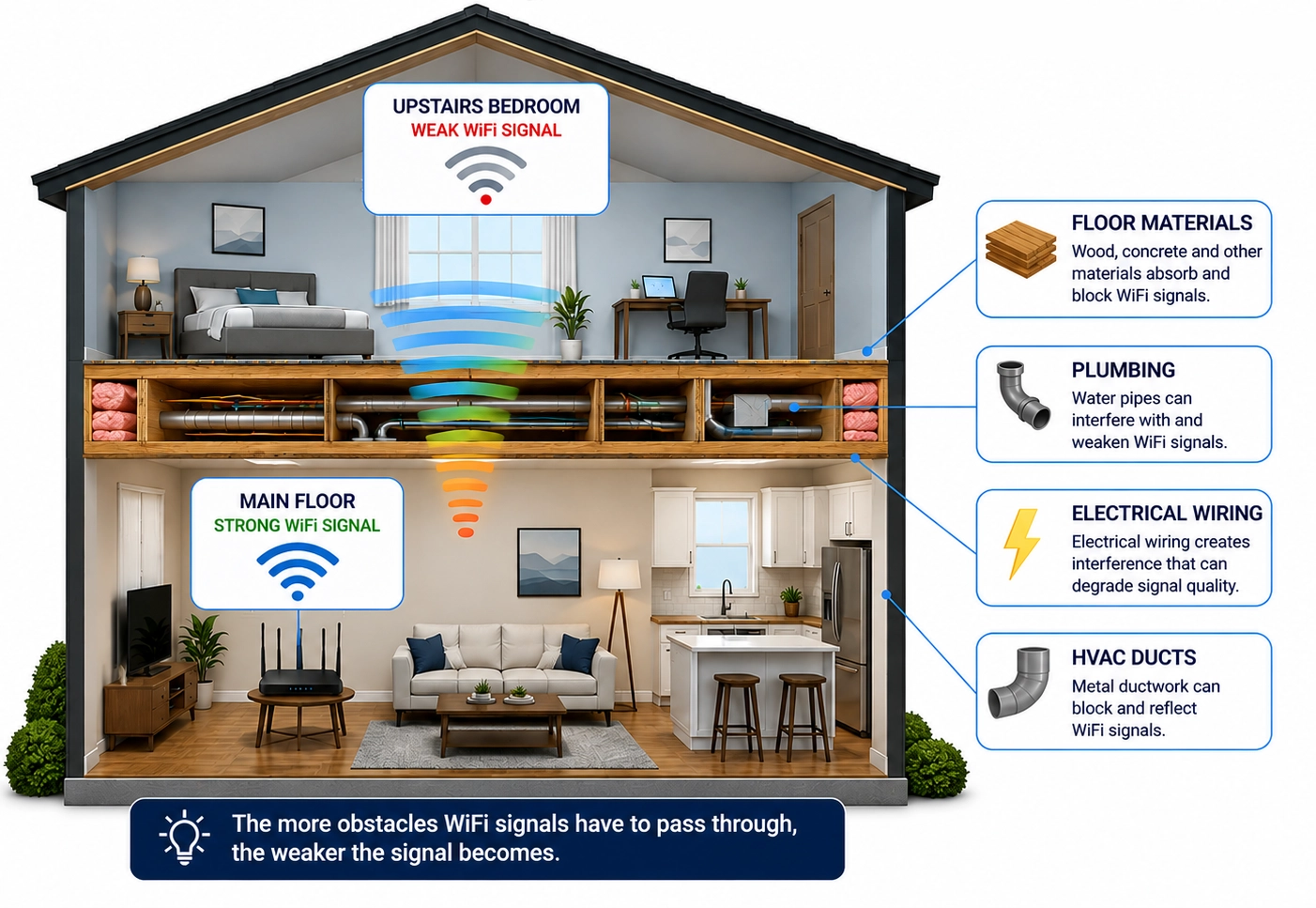
Common Causes of Poor Upstairs WiFi
Cause Distance from router
Impact on WiFi Signal weakens over longer distances
Signs That Weak WiFi Is the Problem
Many homeowners assume they need a faster Internet package when they experience connectivity issues upstairs.
However, weak WiFi coverage often causes symptoms such as:
- Streaming services buffering upstairs but working fine downstairs
- Video calls freezing or dropping
- Slower download speeds in certain rooms
- Online gaming lag
- Dead zones where devices frequently disconnect
- Smart home devices losing connectivity
If these problems occur only in certain areas of your home, WiFi coverage may be the real issue.
Why Faster Internet Usually Doesn’t Fix the Problem
Many homeowners upgrade from a 300 Mbps plan to a Gigabit Internet plan hoping to solve coverage issues.
Unfortunately, additional Internet speed cannot strengthen a weak WiFi signal.
Think of it this way:
If water isn’t reaching the second floor of your house, installing a larger water tank doesn’t solve the problem.
The issue is getting the water where it needs to go.
WiFi works much the same way.
Why WiFi Extenders Don’t Always Deliver Better Results
WiFi extenders are designed to repeat an existing signal.
The challenge is that they can only repeat the signal they receive.
If the signal reaching the extender is already weak, the extended signal may still provide disappointing performance.
This is why some homeowners install an extender upstairs only to find that speeds remain inconsistent.
Why Mesh Systems Work Better
Mesh WiFi systems improve coverage by placing multiple access points throughout the home.
Instead of relying on one router to reach every room, mesh nodes share the workload.
This often improves coverage on multiple floors.
However, many homeowners don’t realize that the best-performing mesh systems often use a wired connection between nodes whenever possible.
This is called a wired backhaul.
What Is a Wired Backhaul?
A wired backhaul connects networking equipment using a physical cable instead of a wireless connection.
Because the connection is wired, it is:
- Faster
- More reliable
- Less affected by interference
- Better for streaming, gaming, and video conferencing
This is why businesses, schools, and enterprise networks rely heavily on wired connections whenever possible.
Wireless Backhaul vs Wired Backhaul
Wireless Backhaul
Wireless link between router and mesh node.

Wired Backhaul
Wired connection over existing coax cable.

You May Already Have the Wiring You Need
When people think about creating a wired connection between floors, they often assume they need to hire an electrician or run new Ethernet cable through their walls.
In reality, many homes already contain a network of coax cables that connect rooms throughout the house.
These are the same coax outlets that were originally installed for cable television or Internet service.
Using MoCA technology, these existing coax cables can often be used to carry Ethernet traffic between rooms.
This allows homeowners to create a wired backhaul without opening walls or running new cabling.
For example, a MoCA adapter can be connected near your router and another near an upstairs mesh node, creating a fast, wired connection between floors using the home’s existing coax wiring.
This can improve the performance of:
- Mesh WiFi systems
- Wireless access points
- Home offices
- Gaming setups
- Streaming devices
Solutions such as Hitron’s HTEM5 MoCA Adapters make it possible to convert compatible coax wiring into high-speed Ethernet connections, helping improve network performance throughout the home.
Convert Existing Coax into Ethernet

Coax Wall Outlet
HTEM5 Adapter
Ethernet Connection
Mesh Node / Computer / Gaming Console
Comparing Common WiFi Improvement Options
Solution
Difficulty
Cost
Reliability
Want to Learn How It Works?
If your WiFi gets worse upstairs, your home may already contain the wiring needed to improve coverage and performance.
👉 Related: How Do I Convert Coax to Ethernet?
In that guide, you’ll learn how coax-to-Ethernet technology works, what equipment is required, and how MoCA adapters can help create faster, more reliable connections throughout your home.
Ready to Improve WiFi Upstairs?
If weak WiFi upstairs is caused by distance, building materials, or poor signal coverage, simply upgrading your Internet package may not solve the problem.
Many homes already contain coax wiring that can be used to create a faster and more reliable network connection between floors.
Learn how existing coax outlets can be transformed into Ethernet connections and how solutions such as Hitron’s HTEM5 MoCA Adapters can help improve network performance throughout your home.


