MoCA splitters are coaxial cable splitters that can pass the higher-frequency signals used by a MoCA network. If you plan to use your home’s existing coax wiring to create a wired Ethernet connection, the splitters already installed in your coax network can affect whether MoCA works reliably.
A standard coax splitter may work for cable TV or internet service but may not support the frequencies needed for MoCA. For a MoCA network, look for splitters specifically rated for MoCA and capable of supporting the frequency range used by your MoCA equipment.
👉 Related: What Is MoCA and How Does It Work?
What Is a MoCA Splitter?
A MoCA splitter is a coaxial splitter designed to allow MoCA signals to travel between connected coax cables.
A coax splitter takes one coax connection and divides it into two or more connections. You may already have splitters in your home if multiple rooms have coax outlets for cable TV, a cable modem, or other coax-connected equipment.
For example:
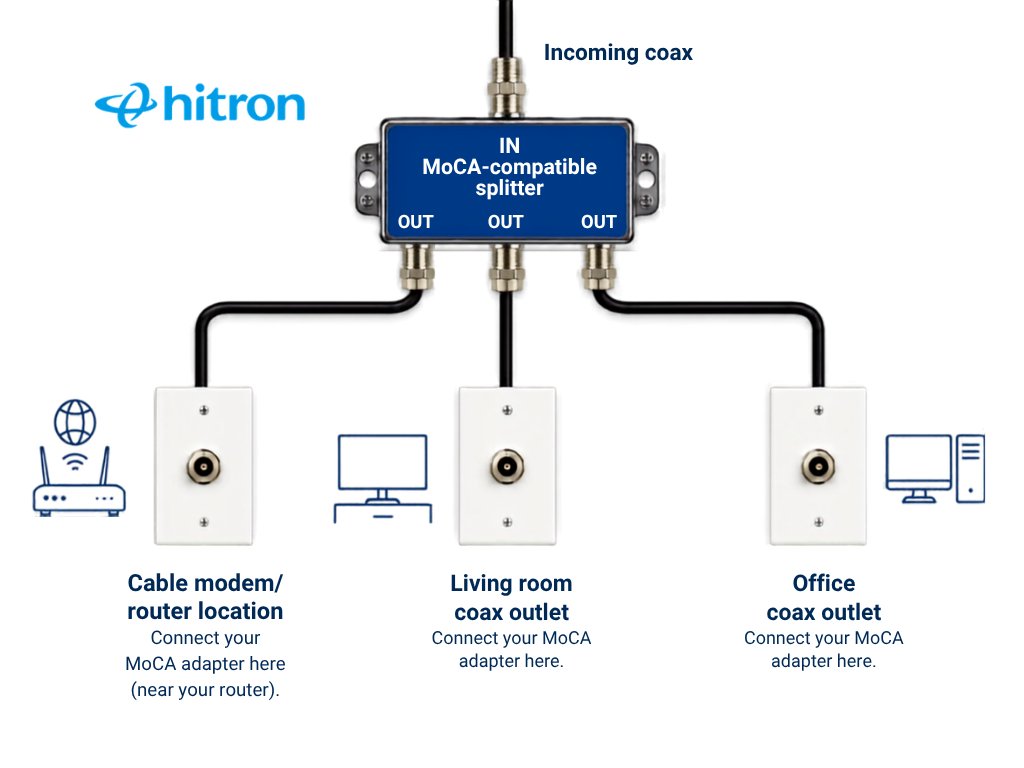
When MoCA adapters communicate over that same coax network, the MoCA signal may need to pass through one or more of these splitters.
If a splitter does not support the required frequencies, it can weaken or block the MoCA signal.
Why Do Splitters Matter for MoCA?
MoCA uses frequencies on the coax cable that are different from many traditional cable TV signals.
Older splitters may have been installed specifically for cable television and may only be rated for lower frequencies. Because MoCA operates at higher frequencies, these older splitters can introduce additional signal loss or prevent reliable communication between MoCA devices.
This means your coax cable itself may be perfectly usable for MoCA, but an incompatible splitter somewhere in the coax network can still cause problems.
💡 Tip: If you are preparing your home for MoCA, check both the coax outlets you plan to use and the splitters connecting those outlets.
What Frequency Should a MoCA Splitter Support?
For a MoCA 2.5 network, use a splitter designed to support MoCA frequencies.
MoCA 2.5 operates within the extended D-band frequency range of approximately 1125 to 1675 MHz. A MoCA-compatible splitter should therefore support frequencies through at least 1675 MHz.
Many splitters designed specifically for MoCA are rated approximately 5–1675 MHz.
Do not assume that a splitter is MoCA-compatible simply because it has a high frequency number printed on it. Splitters designed for satellite systems, for example, may cover higher frequencies but may not have the characteristics needed for reliable MoCA communication between output ports.
The safest choice is a splitter that is specifically identified as MoCA-compatible.
Can I Use My Existing Coax Splitters with MoCA?
Possibly.
Your existing splitters may work if they are already compatible with the frequency range used by your MoCA network. However, older homes may contain splitters that were installed years ago for cable TV service and were never designed with MoCA in mind.
Check the label printed on the splitter. You may see information such as:
- 5–1000 MHz
- 5–1200 MHz
- 5–1675 MHz
- 5–2500 MHz
A splitter rated only to 1000 MHz is not designed to pass the full MoCA 2.5 frequency range and should generally be replaced when setting up a MoCA 2.5 network.
💡 Tip: Splitters are sometimes hidden in basements, utility rooms, structured wiring panels, garages, attics, or behind wall plates. If two coax outlets should be connected but your MoCA adapters cannot establish a connection, an older hidden splitter may be the reason.
👉 Related: Will MoCA Adapters Work in My Home?
How Many Ports Should a MoCA Splitter Have?
Choose a splitter with only as many ports as you actually need.
A 2-way splitter divides one coax connection between two paths. A 4-way splitter divides it between four paths. Each split introduces signal loss.
If you only need two coax connections, there is usually no benefit to installing an 8-way splitter with several unused ports.
For example:
Better:
Coax input
↓
2-way MoCA splitter
├── Room 1
└── Room 2
Less efficient:
Coax input
↓
8-way splitter
├── Room 1
├── Room 2
├── Unused
├── Unused
├── Unused
├── Unused
├── Unused
└── Unused
Using the smallest appropriate splitter can help reduce unnecessary signal loss and simplify your coax network.
What Is Splitter Loss?
Every time a coax signal passes through a splitter, some signal strength is lost. This is called insertion loss.
The splitter usually shows this loss in decibels (dB) beside each output port.
For example, a 2-way splitter might show approximately -3.5 dB at each output. Splitters with more outputs generally introduce greater loss.
This does not mean you cannot use multiple coax outlets with MoCA. MoCA is designed to operate over typical residential coax networks. However, unnecessary splitters, excessive splitter loss, poor coax connections, and long or complicated coax paths can make the network harder for MoCA devices to communicate across.
Keeping the coax network as simple as practical can improve reliability.
Can You Use More Than One Splitter with MoCA?
Yes. A MoCA network can contain more than one splitter.
For example, your home’s coax network might look like this:
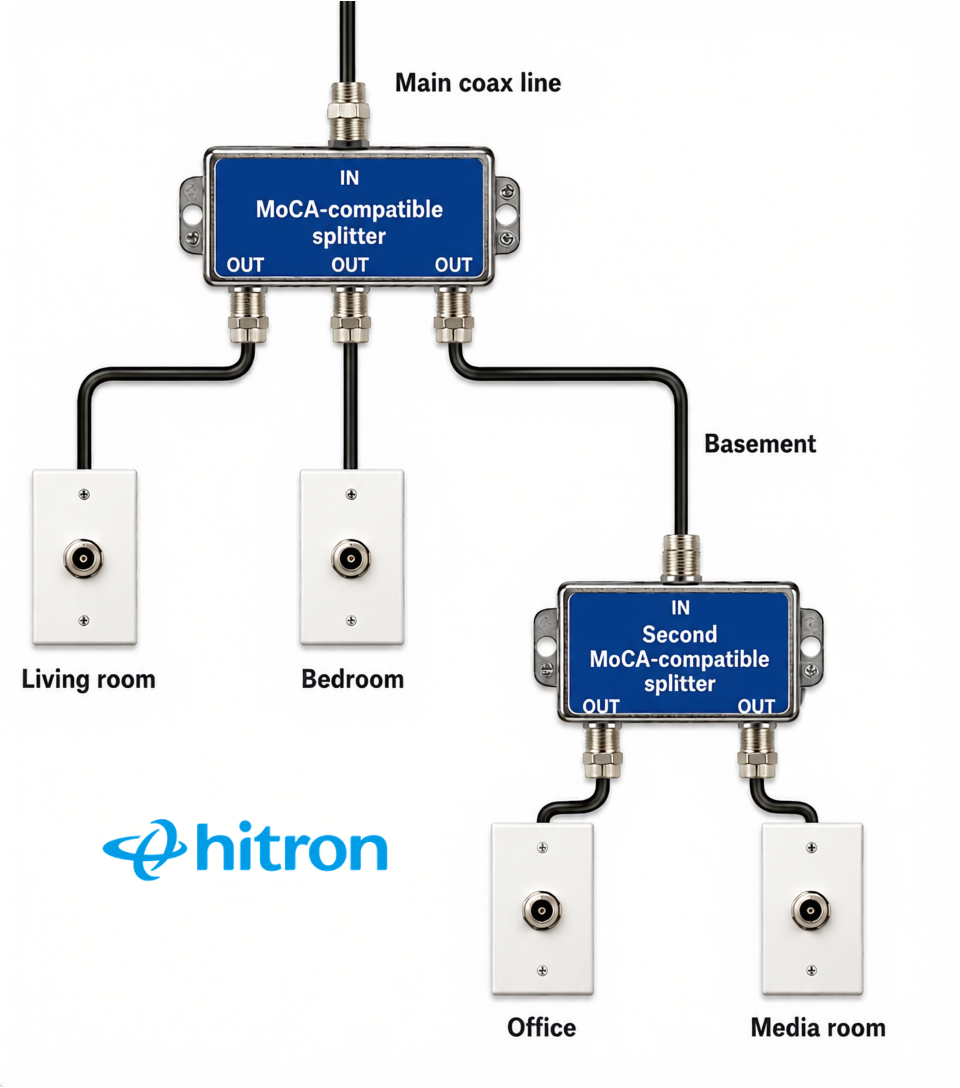
The important consideration is the total coax path between your MoCA devices.
Every additional splitter introduces some signal loss. If you have splitters that are no longer required, removing them can simplify the coax network and reduce unnecessary loss.
Do Unused Coax Splitter Ports Matter?
Unused splitter ports should ideally be terminated with 75-ohm terminators.
Leaving unused coax ports open can allow signal reflections and interference within the coax network. Terminating unused ports helps maintain proper impedance throughout the network.
If you have an oversized splitter with many unused outputs, another option is to replace it with a smaller MoCA-compatible splitter that more closely matches the number of connections you actually use.
Is a Satellite Splitter the Same as a MoCA Splitter?
Not necessarily.
A satellite splitter may advertise a wide frequency range that appears to cover MoCA frequencies. However, frequency range alone does not determine whether a splitter is suitable for MoCA.
MoCA devices need to communicate between different branches of the coax network. A splitter designed specifically for MoCA is engineered to support this type of communication.
For this reason, choose a splitter specifically identified as MoCA-compatible rather than selecting one based only on its maximum frequency rating.
Where Should a MoCA Splitter Be Installed?
MoCA-compatible splitters should be used anywhere the coax network needs to divide while remaining part of the MoCA communication path.
A typical home network might look like:
MoCA adapters connected in the living room and office can then communicate through the home’s coax wiring.
The exact layout will depend on how your home’s coax network was installed.
Do I Need a MoCA Filter with a MoCA Splitter?
A MoCA filter and a MoCA splitter perform different jobs.
A MoCA splitter allows signals to travel between branches of your coax network. A MoCA Point-of-Entry (PoE) filter is used at the boundary of the coax network to help keep MoCA signals contained within the home.
If your coax network connects to an external cable provider network, a properly installed MoCA filter may be required.
Do not confuse a PoE filter with Power over Ethernet (PoE). In a MoCA network, PoE in this context means Point of Entry.
👉 Related: What Is a MoCA PoE Filter and Do I Need One?
How to Choose a MoCA Splitter
When choosing a splitter for a MoCA 2.5 network, look for:
- MoCA compatibility
- Support through at least 1675 MHz
- The correct number of output ports
- 75-ohm coax connections
- Clearly identified input and output ports
- Appropriate insertion-loss specifications
You should also consider the overall coax network rather than evaluating each splitter individually.
A high-quality MoCA splitter cannot compensate for disconnected coax outlets, damaged cables, poor connectors, or coax lines that are part of separate networks.
💡 Tip: Before buying additional MoCA equipment, trace the coax connections you plan to use and identify any splitters between them. This can help you find compatibility problems before installation.
Do I Need to Replace Every Splitter in My House?
No. You only need to be concerned with splitters that are part of the coax network carrying your MoCA signal.
If an old splitter connects coax lines that are completely separate from your MoCA network, it will not affect your MoCA connection.
Focus on the path between the coax outlets where your MoCA devices will be connected.
If you are unsure which splitters are part of that path, tracing your home’s coax wiring can help determine how the outlets are connected.
👉 Related: Will My Coax Wiring Work with MoCA?
MoCA Splitter Checklist
Before setting up your MoCA network, check that:
- Your splitter is specifically compatible with MoCA.
- It supports frequencies through at least 1675 MHz for MoCA 2.5.
- You are using only the number of splitter ports you need.
- Unused splitter ports are properly terminated.
- Unnecessary splitters have been removed where practical.
- The coax outlets you want to use are connected through the same coax network.
- A MoCA Point-of-Entry filter is installed where required.
These simple checks can prevent many common MoCA connection problems.
Build a Reliable Wired Connection over Coax
MoCA lets you use existing coax wiring to create a fast, wired network connection without running new Ethernet cable through your home. But the coax network between your MoCA adapters matters.
Using MoCA-compatible splitters, removing unnecessary coax branches, and checking how your outlets are connected can help provide a more reliable MoCA connection.
Hitron’s HTEM5 MoCA 2.5 Network Adapter uses your home’s existing coax wiring to extend Ethernet connectivity to rooms where running new Ethernet cable may be difficult.