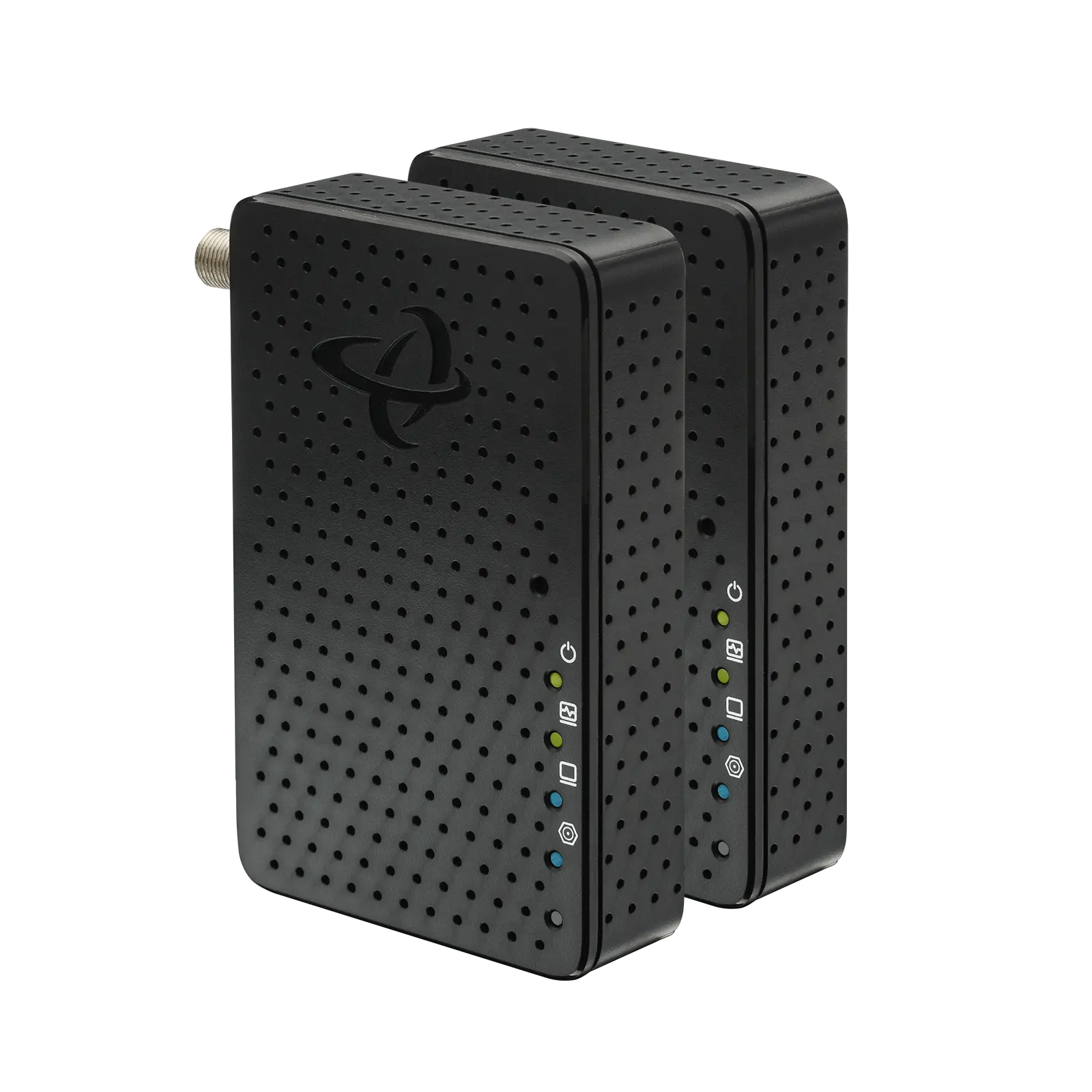
If you want a faster, more reliable wired connection in a room without Ethernet wiring, MoCA Adapters can be an effective solution. They use the coaxial cable already installed in many homes to carry Ethernet network traffic between rooms.
But not every home or MoCA setup is the same. Before you buy, it helps to know what equipment you need, whether your coax wiring will work, what speeds to look for and whether your existing splitters and other coax equipment are compatible.
What Should You Know Before Buying MoCA Adapters?
Before buying MoCA Adapters, check that you have coax outlets where you need them, that those outlets are connected through the home’s coax network and that your splitters support MoCA frequencies. You should also consider the MoCA version, Ethernet port speed, how many adapters you need and whether your network requires a MoCA Point of Entry (PoE) filter.
The good news is that you usually do not need to replace your existing coax wiring or run new Ethernet cable through your walls.
What Are MoCA Adapters?
MoCA stands for Multimedia over Coax Alliance. MoCA technology allows Ethernet network traffic to travel over the coaxial cables commonly installed for cable TV and cable Internet service.
A MoCA Adapter converts between Ethernet and coax.
A typical connection looks like this:
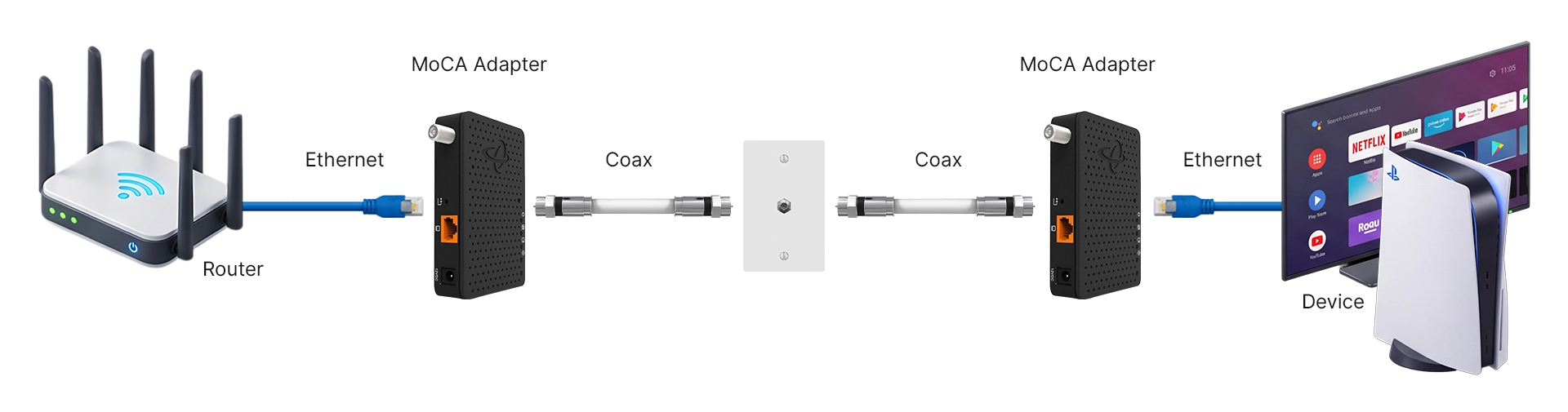
The connected device sees a normal Ethernet connection. The coax wiring simply provides the path between the two MoCA Adapters.
This can be useful when you need a wired connection in a bedroom, basement, home office or entertainment room but do not have Ethernet cabling running to that location.
👉 Related: What Is MoCA?
1. Does Your Home Have Coax Outlets Where You Need Them?
Start with the physical layout of your home.
You generally need access to coax near the router and near the location where you want Ethernet. For example, if your router is upstairs and your gaming console is in the basement, having coax outlets in both locations may allow you to create a wired network connection between them.
Having coax outlets does not automatically mean the outlets are connected to each other. Older homes may have unused, disconnected or separately wired coax runs.
💡 Tip: Before buying MoCA Adapters, identify the coax outlets you plan to use and determine whether they are part of the same connected coax network.
2. What MoCA Version Should You Buy?
MoCA Adapters are available using different generations of MoCA technology.
For a new home network, MoCA 2.5 is generally the version to look for. MoCA 2.5 provides substantially more network capacity than earlier MoCA generations and is designed for modern high-speed home networks.
Older MoCA standards may support lower speeds.
If you are buying new equipment rather than adding to an older MoCA network, choosing MoCA 2.5 gives you more capacity for current and future network speeds.
👉 Related: MoCA – A Complete Guide
3. Check the Ethernet Port Speed, Not Just the MoCA Version
A MoCA Adapter’s MoCA specification is only part of the speed equation.
The Ethernet port on the adapter also matters.
For example, a MoCA 2.5 Adapter with only a 1 Gigabit Ethernet port cannot provide more than a Gigabit Ethernet connection through that port.
If you have multi-gig Internet service or network equipment with 2.5 Gigabit Ethernet ports, look for a MoCA 2.5 Adapter with a 2.5 Gigabit Ethernet port.
Keep in mind that a faster MoCA Adapter does not make your Internet service itself faster. It helps prevent the MoCA connection from becoming an unnecessary bottleneck between devices on your home network.
4. Do You Need One MoCA Adapter or Two?
In many homes, you will need two MoCA Adapters.
One adapter connects to your router and the home’s coax network. The second connects to the coax outlet in the room where you want Ethernet.
However, you may only need one adapter if your modem/router or gateway already has MoCA built in and that MoCA functionality is enabled.
Before purchasing a pair, check your existing gateway specifications.
💡 Tip: Do not assume that having a coax connector on your modem or router means it supports MoCA networking. Check the manufacturer’s specifications for MoCA support.
👉 Related: What Is MoCA on My Router & Why Do I Want It?
5. Will MoCA Work with Your Cable Internet or TV Service?
MoCA is designed to share coaxial wiring with many existing cable services.
That means the same coax network can often carry:
- cable Internet signals
- cable television signals
- MoCA network traffic
These services use different frequency ranges, allowing them to coexist on the same coax infrastructure when the network is properly configured.
This is one of the main reasons MoCA can be practical in an existing home. You may be able to add wired networking without giving up the coax services you already use.
Compatibility can vary with some satellite TV systems and other coax-based technologies, so those systems should be checked before adding MoCA equipment.
👉 Related: Does MoCA Interfere with Your Cable Modem?
6. Are Your Coax Splitters Compatible with MoCA?
Coax splitters are easy to overlook when planning a MoCA network.
A splitter divides a coax signal so that it can reach multiple coax outlets. If your home has several coax outlets, one or more splitters may be located in a basement, utility room, structured wiring panel or outside service box.
Older splitters may not pass the frequencies used by MoCA effectively.
For MoCA 2.5 networks, look for splitters designed to support MoCA frequencies, commonly rated to at least 1,675 MHz.
Using an incompatible splitter can contribute to weak MoCA connections or prevent adapters from establishing a connection.
7. Do You Need a MoCA Filter?
A MoCA Point of Entry filter, sometimes called a PoE filter, is installed where the coax network enters the home.
Its purpose is to help keep MoCA signals contained within the home’s coax network instead of allowing them to travel back toward the cable provider’s network.
A properly placed MoCA filter can also help keep the MoCA network isolated and support proper network performance.
Some homes or cable installations may already have an appropriate filter installed. If you are unsure, check the point where the coax service enters the home or consult your service provider.
👉 Related: MoCA Filter: What It Is & Where to Place
8. What Devices Do You Want to Connect?
Think about what problem you are trying to solve before choosing MoCA Adapters.
MoCA makes the most sense for devices or locations that benefit from a wired network connection.
Home offices
A MoCA connection can provide Ethernet to a desktop computer, docking station, VoIP phone or other office equipment when the office has coax but no Ethernet outlet.
Gaming consoles and PCs
A wired connection can reduce your dependence on WiFi conditions for online gaming, especially when the gaming setup is far from the router.
Smart TVs and streaming devices
Entertainment centers often already have coax nearby. MoCA can provide a wired Ethernet connection for compatible TVs, streaming players and other devices.
WiFi access points and mesh systems
MoCA can also provide a wired backhaul connection between network equipment in different parts of the home, depending on the equipment being used.
Multiple Ethernet devices
If several wired devices are located in the same room, you can connect an Ethernet switch to the MoCA Adapter rather than installing a separate MoCA Adapter for every device.
👉 Related: Using Ethernet to Coax MoCA Adapters to Extend Your Ethernet Network
9. Make Sure Your Other Network Equipment Can Support the Speed
A MoCA network is only one part of the connection.
The actual speed a device receives can also be limited by:
- your Internet service plan
- router Ethernet port speeds
- Ethernet switches
- network interface speeds on connected devices
- Ethernet cable capabilities
- the condition and layout of your coax network
For example, connecting a 2.5 Gigabit MoCA Adapter to a router’s 1 Gigabit Ethernet port means that particular Ethernet connection is limited to approximately Gigabit-class speeds.
This does not make the faster MoCA Adapter unnecessary. It simply means you should look at the network as a complete system rather than judging performance from one specification.
10. Check What Comes with the MoCA Adapter
Before comparing prices, compare what is actually included.
Depending on the product, you may need:
- one or two MoCA Adapters
- power adapters
- Ethernet cables
- coax cables
- MoCA-compatible splitters
- a MoCA Point of Entry filter
Some products are sold individually, while others are sold as kits.
Checking the package contents before ordering can prevent you from getting halfway through the installation and realizing that you need another adapter or cable.
When Are MoCA Adapters a Good Choice?
MoCA Adapters are especially useful when your home already has coax wiring but does not have Ethernet installed where you need a wired connection.
They can be a strong fit when:
- WiFi performance is inconsistent in a particular room
- running new Ethernet cable would be difficult or expensive
- you want Ethernet for gaming or streaming
- you need a wired home-office connection
- you want wired backhaul for compatible WiFi equipment
- you need to extend your wired network to another floor or room
MoCA is not intended to replace WiFi throughout the home. Instead, it can complement WiFi by using existing coax to create wired network connections where they provide the most benefit.
👉 Related: MoCA Adapter Explained: What It Is and Why You Might Need One
What Should You Check Before You Buy?
Before ordering MoCA Adapters, work through these questions:
- Do I have coax outlets near my router and the room where I need Ethernet?
- Are those coax outlets connected?
- Am I buying MoCA 2.5 equipment?
- What Ethernet port speed do the adapters support?
- Do I need one adapter or two?
- Are my coax splitters compatible with MoCA frequencies?
- Do I have or need a MoCA Point of Entry filter?
- Does another service use my coax network?
- What network speed can my router and connected devices support?
- Does the package include the cables and accessories I need?
Answering these questions before you buy makes it much easier to choose the right equipment and avoid setup problems later.
Using Hitron HTEM5 MoCA 2.5 Adapters
Hitron’s HTEM5 MoCA 2.5 Adapters are designed to turn existing coax wiring into a high-speed wired network connection.
HTEM5 supports MoCA 2.5 and includes a 2.5 Gigabit Ethernet port, making it suitable for applications such as gaming, streaming, home offices and extending wired connectivity to rooms without Ethernet cabling.
A pair of HTEM5 Adapters can create the MoCA connection between your router and another coax-connected room. If your existing gateway already supports MoCA, your setup may require only one adapter at the remote location.
MoCA Adapter Buying Guide: Quick Recap
Before Buying MoCA Adapters:
1
2
3
4
5
6
7
8
9

The most important step is checking your home’s coax network before you buy. A few minutes spent understanding the wiring and equipment can prevent many common MoCA setup problems.
FAQs
Are all MoCA Adapters compatible with each other?
MoCA standards are designed with interoperability in mind, and newer MoCA versions generally support compatibility with earlier versions. However, the network may operate according to the capabilities of the equipment involved. For the best performance, using adapters based on the same current MoCA standard is usually preferable.
Do I need two MoCA Adapters?
Can I use MoCA Adapters with cable Internet?
Yes. MoCA and cable Internet can typically share the same coax wiring because they operate using different frequency ranges. The coax network must still be configured correctly, including compatible splitters and, where appropriate, a MoCA Point of Entry filter.
Will MoCA Adapters work with any coax outlet?
Can I connect an Ethernet switch to a MoCA Adapter?
Do I need special coax cable for MoCA?
Turn Existing Coax into a Wired Network Connection
If you have coax outlets but no Ethernet where you need a reliable wired connection, MoCA may let you use the wiring already inside your home.
Hitron’s HTEM5 MoCA 2.5 Adapters give you a way to extend a wired Ethernet connection over your home’s existing coax wiring, without running new Ethernet cable through the walls.
Before buying, check your coax outlets, splitters and existing equipment so you know exactly what your setup requires.
Learn more about the Hitron HTEM5 MoCA 2.5 Adapter and see whether MoCA is the right fit for your home network.